📝 How to Rename Files with Numeric Prefixes in Linux 🚀
Have you ever wanted to rename files by adding a numeric prefix based on the order they were created? Here's a simple way to achieve this using a single command in Linux. By the end of this post, you'll know how to sort your files by creation time and rename them while keeping their original names intact!
💡 What I Want to Achieve:
To keep the file names and just add numbers as prefixes, you can use the following command:
ls -1tr | cat -n | while read n f; do mv "$f" "${n}_$f"; done
This command will:
-
List your files sorted by creation time (
ls -1tr). -
Add a numeric prefix to each file (
cat -n), wherenis the number andfis the file name. -
Rename each file to
n_originalname(e.g.,1_filename,2_filename, etc.).
🎯 Steps:
-
Navigate to the directory where your files are stored.
-
Run the command.
-
That's it! Your files will now be prefixed with numbers while keeping the original names.
🚀 Adding a Screenshot
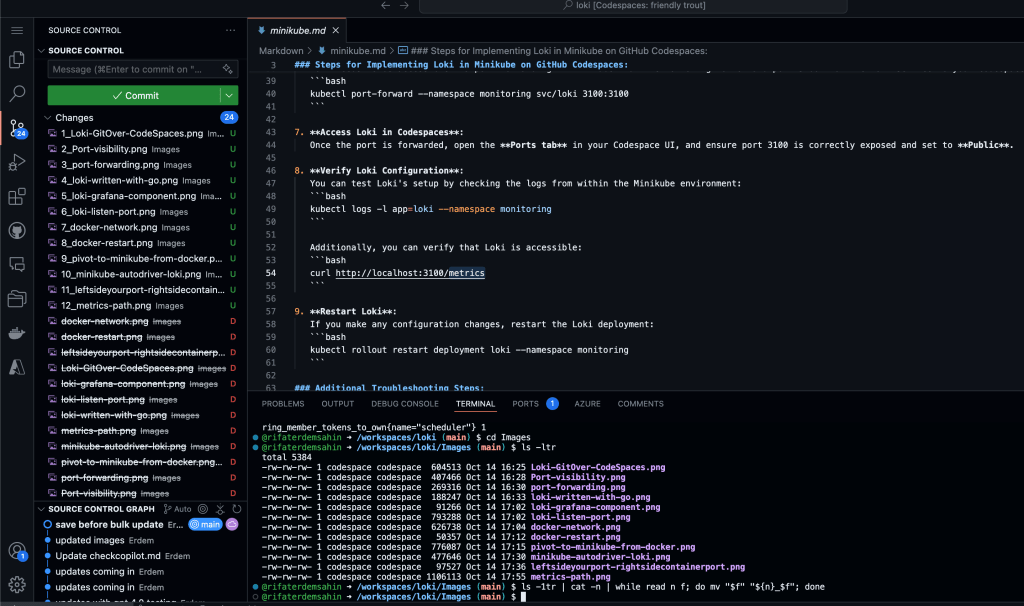
Here’s how it works in practice. Just open your terminal, and after running the command, you'll see:

This screenshot shows how the files were renamed in one of my projects. 📸
🔗 Connect with me:
Feel free to reach out if you have questions or want to chat about Linux, programming, or anything tech-related!
Stay tuned for more tips and tricks!
Imported from rifaterdemsahin.com · 2026