📡 Testing a 4G Router to Move Data to NAS: A Wireless Marvel! 🚀
Hey tech enthusiasts! 👋 Today, I’m diving into an exciting experiment: testing a 4G router to move data to my NAS (Network Attached Storage) unit. The results? Pretty impressive! Let’s break it down. 🧑💻
🎯 What I Wanted to Achieve
The goal was simple: test the capabilities of a 4G router to transfer large amounts of data wirelessly to my NAS. With wireless technology often being seen as less reliable for heavy data transfers, I wanted to see if a 4G router could handle the challenge. Spoiler alert: it did! 😎
📊 The Results
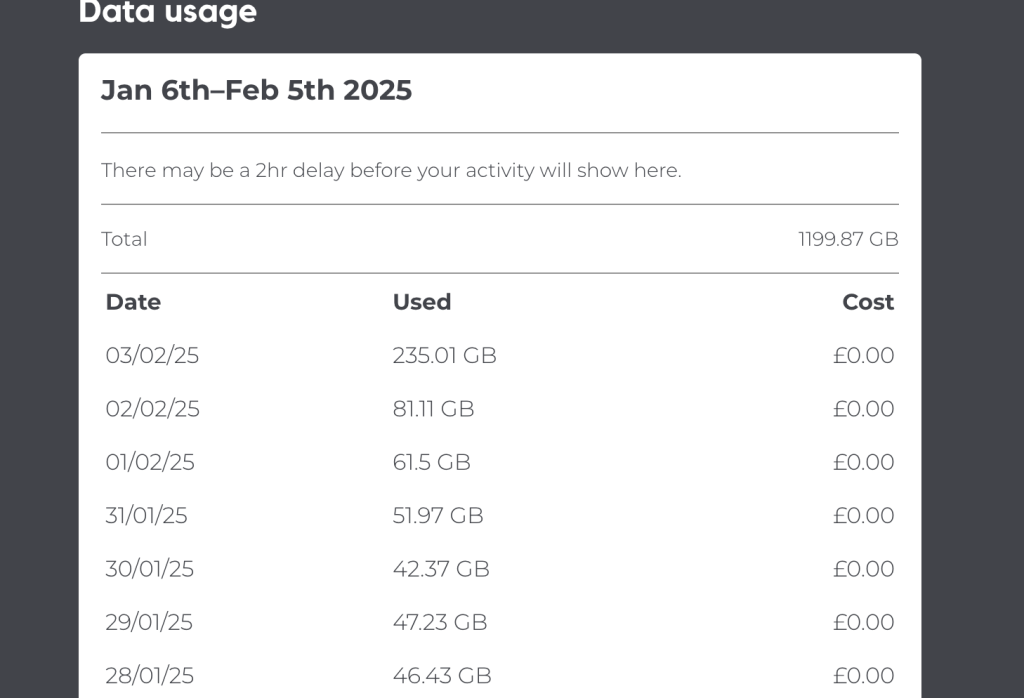
After running the test, the top download speed and total download reached 250 GB! 🚀 That’s not bad at all, especially when you consider that this is a wireless technology. Here’s a quick screenshot of the results:
💡 Why This Matters
-
Wireless Flexibility: 4G routers allow you to move data without the need for physical cables, making it a great option for remote or mobile setups.
-
NAS Integration: Pairing a 4G router with a NAS unit opens up possibilities for seamless data storage and access, even on the go.
-
Future-Proofing: As 5G becomes more widespread, testing 4G now gives us a baseline for understanding wireless data transfer capabilities.
🛠 How I Did It
-
Set Up the 4G Router: Connected the router to my network and ensured a stable signal.
-
Connected to NAS: Configured the NAS unit to accept data transfers over the network.
-
Initiated Data Transfer: Started moving large files to the NAS and monitored the speed and stability.
-
Analyzed the Results: Noted the peak download speed and overall performance.
🚀 Key Takeaways
-
250 GB is a solid achievement for wireless data transfer.
-
4G routers are more capable than many people think, especially for large-scale data movement.
-
This test lays the groundwork for exploring 5G routers in the future, which could push these limits even further.
🔗 Connect with Me
If you found this experiment interesting, let’s connect! I’m always exploring new tech frontiers and sharing my findings. Here’s where you can find me:
-
💼 LinkedIn: Rifat Erdem Sahin
-
🐦 Twitter: @rifaterdemsahin
-
🎥 YouTube: Rifat Erdem Sahin
-
💻 GitHub: rifaterdemsahin
Let me know your thoughts! Have you tried something similar? What’s your experience with 4G routers and NAS units? Drop a comment below or reach out on any of my platforms. Let’s geek out together! 🤓✨
Stay tuned for more tech experiments and tutorials! 🚀
Testing Smarty to the limits
Imported from rifaterdemsahin.com · 2026