🚀 Power of Codespaces and GitHub: A DevOps Dream Come True
💡 What I Want to Achieve:
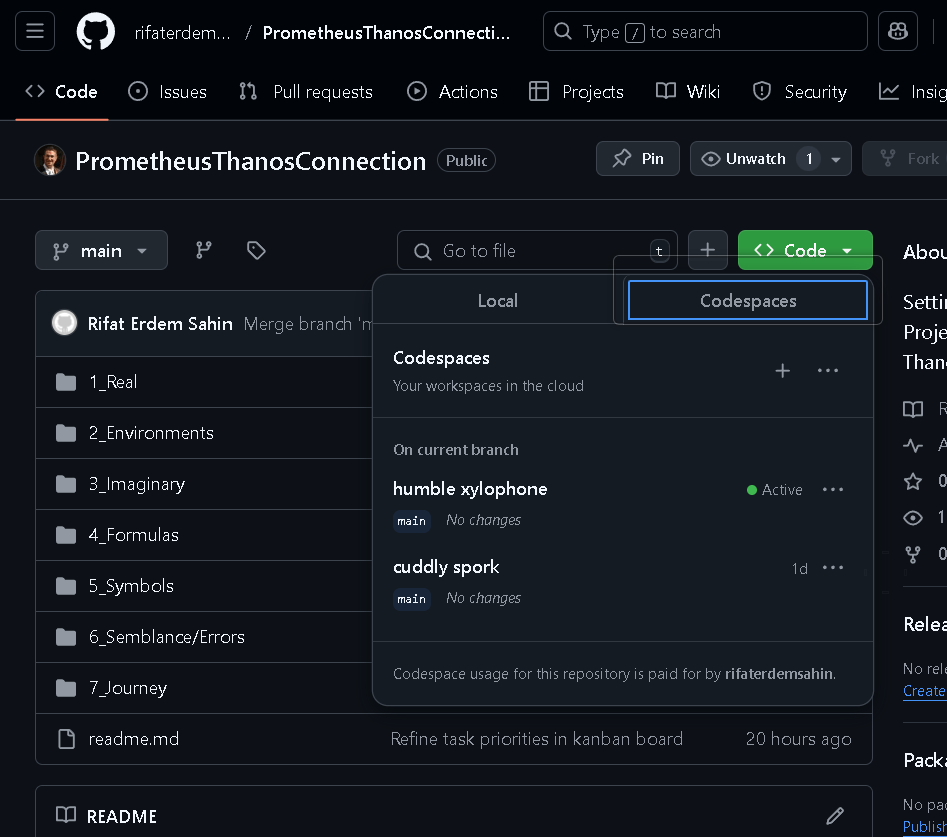
After running into the dreaded Pulumi error while playing around with Docker, I realized I needed to create a fresh environment to test my setup. That's where Codespaces came to the rescue! This post is all about how I used the power of GitHub Codespaces to seamlessly spin up a new environment and continue my work without missing a beat.
🖥️ Codespaces + GitHub = DevOps Heaven
Imagine a system that eliminates local configuration headaches, provides instant access to cloud-based development environments, and gives you the tools you need to build, test, and deploy—all in one place. Sounds like a dream, right? That’s exactly what Codespaces offers, making it a perfect match for DevOps workflows.
🎯 Why Codespaces?
-
Instant Environments: Quickly create new development environments without affecting your local machine.
-
Fully Integrated with GitHub: Codespaces are tightly integrated with GitHub repositories, making pull requests, commits, and branching super efficient.
-
Cloud-Based: Everything runs in the cloud, freeing up local resources and offering great flexibility for teams working remotely.
🛠️ My Workflow
-
Issue Faced: After trying out Docker setups, a Pulumi error halted my progress.
-
Solution: I created a new environment in GitHub Codespaces to continue my tests. This took just a few minutes and allowed me to keep developing without worrying about local system issues.
-
Result: I’m now back on track, testing my code in a fresh, isolated environment that’s perfect for running the necessary DevOps processes.
💡 Pro Tip: When using Codespaces, you can preconfigure development environments by adding a .devcontainer folder to your repo, ensuring that everyone on your team has the same setup.
🌟 Final Thoughts
GitHub Codespaces has truly transformed how I approach DevOps workflows. The ability to spin up a fresh environment whenever I encounter an issue makes it a powerful tool for any developer or DevOps engineer.
🔗 Connect with me:
-
💼 LinkedIn: https://www.linkedin.com/in/rifaterdemsahin/
-
🐦 Twitter: https://x.com/rifaterdemsahin
-
🎥 YouTube: https://www.youtube.com/@RifatErdemSahin
-
💻 GitHub: https://github.com/rifaterdemsahin
📸 [Insert Screenshot of Codespaces Interface]
Imported from rifaterdemsahin.com · 2026