🚀 Managing Codespaces: Too Many Running!
Got it! You want to create a blog post about managing GitHub Codespaces, specifically addressing the issue of running too many of them simultaneously. Here's a potential draft:
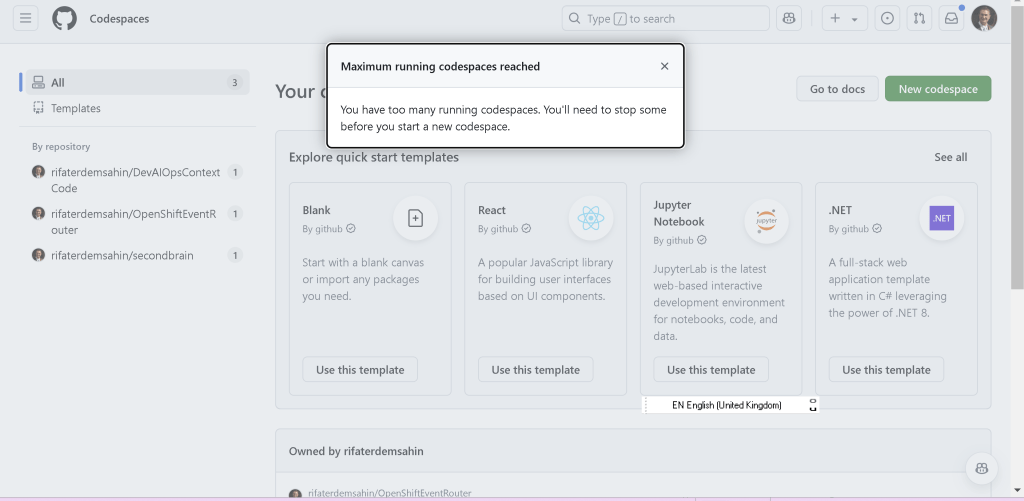
Have you ever encountered this error while working with GitHub Codespaces?
"Maximum running codespaces reached"
You have too many running codespaces. You'll need to stop some before you start a new codespace.
GitHub Codespaces is an incredible tool for cloud-based development, but like any resource, it has limits! Running too many Codespaces can create bottlenecks, especially when juggling multiple projects.
💡 Why This Happens
GitHub enforces a limit on the number of active Codespaces per user to optimize resource utilization. This ensures fair usage and avoids overloading the system.
🛠️ How to Resolve It
Here are a few tips to manage your Codespaces effectively:
- Pause or Stop Unused Codespaces:
Navigate to your Codespaces dashboard.
-
Identify the ones you're not actively using.
-
Stop or delete them to free up space.
-
Use Templates Wisely:
If you often start with similar setups, consider using templates to save time. This way, you can quickly recreate environments as needed.
- Plan Ahead:
Before starting a new Codespace, evaluate if you really need multiple environments running concurrently.
- Check Your Plan Limits:
Free-tier plans often have stricter limits. Upgrading your plan might give you additional capacity.
✍️ What I've Learned
Managing multiple projects can be tricky. It's easy to get carried away, but keeping your workspace tidy ensures smooth development and better resource allocation. Next time you see this error, you'll know what to do!
🔗 Connect with me:
-
💼 LinkedIn: https://www.linkedin.com/in/rifaterdemsahin/
-
🐦 Twitter: https://x.com/rifaterdemsahin
-
🎥 YouTube: https://www.youtube.com/@RifatErdemSahin
-
💻 GitHub: https://github.com/rifaterdemsahin
Let me know if you'd like to tweak this or add more details!
Imported from rifaterdemsahin.com · 2025