What’s Installed on My Chrome: A Deep Dive into My Browser Extensions
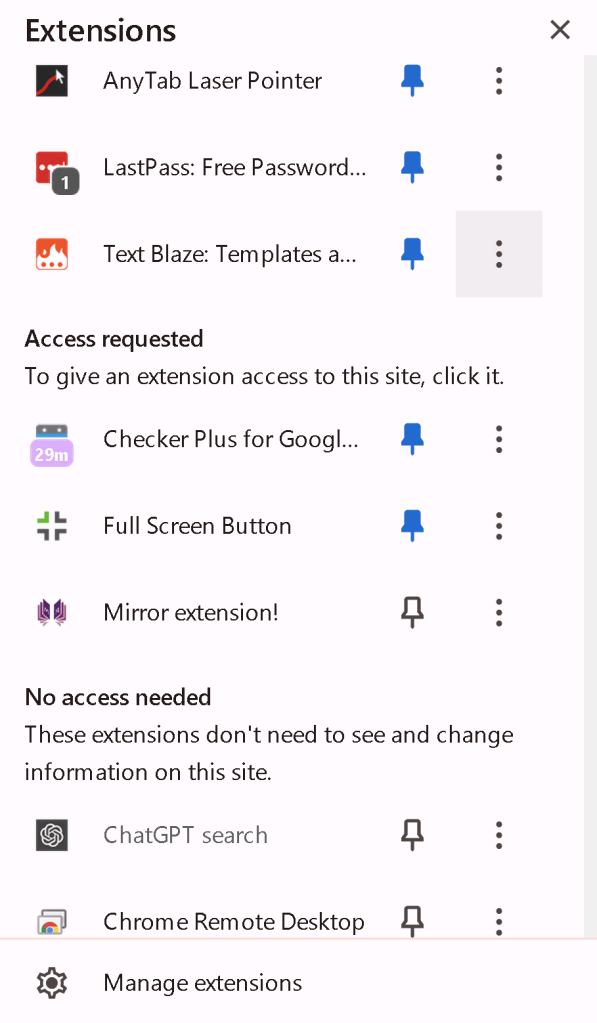
In today’s digital age, browser extensions have become essential tools for enhancing productivity, security, and overall browsing experience. I recently took a closer look at the extensions installed on my Chrome browser to understand how they contribute to my daily online activities. Here’s a breakdown of what’s currently installed and how I use each one.
1. LastPass: Free Password Manager
LastPass is a lifesaver when it comes to managing passwords. It securely stores all my login credentials and automatically fills them in when I visit a site. This not only saves time but also ensures that I use strong, unique passwords for each account, significantly boosting my online security.
2. Text Blaze: Templates and Text Expander
Text Blaze is a fantastic tool for anyone who frequently types the same phrases or responses. It allows me to create custom templates and snippets that I can insert with just a few keystrokes. Whether I’m drafting emails or filling out forms, Text Blaze helps me work more efficiently.
3. Checker Plus for Google Calendar
Checker Plus is a must-have for anyone who relies heavily on Google Calendar. It provides quick access to my schedule and sends reminders directly from the browser. I no longer need to open the calendar app separately, which streamlines my workflow.
4. Full Screen Button
As someone who often works with multiple tabs and windows, the Full Screen Button extension is incredibly useful. It allows me to quickly toggle full-screen mode, giving me more screen real estate when I need to focus on a specific task.
5. Mirror Extension
The Mirror extension is a handy tool that I use to mirror web pages to other devices. This is particularly useful when I want to share content with colleagues or view a page on a larger screen without manually navigating to it.
6. ChatGPT Search
The ChatGPT Search extension integrates OpenAI’s ChatGPT directly into my browser. It allows me to quickly search for information or get answers to questions without leaving the page I’m on. This is especially useful for research and learning new topics on the fly.
Extensions That Don’t Need Access
Some extensions, like the ones mentioned above, require access to view and change information on the sites I visit. However, there are others that don’t need such permissions. These typically include tools that operate independently of the content on the web pages, such as certain ad blockers or theme customizers.
Conclusion
Each of these extensions plays a unique role in enhancing my browsing experience. From improving security with LastPass to boosting productivity with Text Blaze and Checker Plus, these tools have become indispensable in my daily routine. Regularly reviewing and managing these extensions ensures that my browser remains efficient and secure.
What about you? What extensions do you rely on to make your online experience better? Share your favorites in the comments below!
Imported from rifaterdemsahin.com · 2025