🔒 Why Seal a Secret in OpenShift Kubernetes Environments?
In today's digital landscape, data security isn't just important; it's essential. Kubernetes, paired with OpenShift, offers a powerful, scalable environment for applications, but it also introduces complexities when handling sensitive information, like API keys, passwords, and configuration secrets. That’s where sealed secrets come in! 🛡️
In this post, I’ll walk you through why sealing a secret is a must in OpenShift Kubernetes environments and how it enhances your application’s security posture.
🕵️♂️ What is a Sealed Secret?
In Kubernetes, a secret is a way to store and manage sensitive information. While Kubernetes has its built-in secret management system, these secrets are stored in etcd, the underlying database. By default, they’re encoded in Base64 but aren’t encrypted, making them potentially vulnerable if accessed.
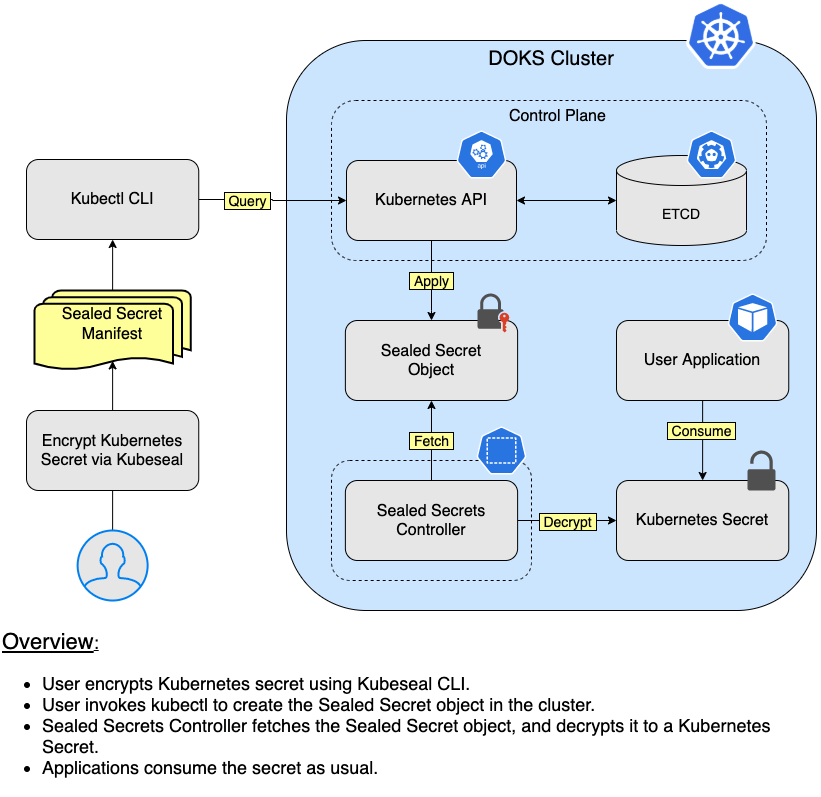
A sealed secret offers an extra layer of encryption. In essence, it’s a Kubernetes secret that is encrypted and only decryptable by the cluster itself. That way, even if someone were to intercept the data, they wouldn’t be able to read it without the cluster’s private key. This concept is crucial when you’re working in an enterprise-level OpenShift environment.
🚀 Why Use Sealed Secrets?
🔒 1. Enhanced Security
With sealed secrets, sensitive data is encrypted at rest and only decrypted within the cluster. This means:
-
Your sensitive data remains protected even if your version control system is breached.
-
The risk of exposing sensitive information is significantly reduced, even in the case of misconfiguration.
🔄 2. Easy-to-Use and Reproducible
Sealed secrets allow you to store encrypted secrets as Kubernetes manifests, which are easy to replicate across environments. For example:
-
You can store sealed secrets in Git repositories without exposing sensitive data.
-
Environments like staging, testing, and production can all use the same sealed secrets configurations without the risk of accidental exposure.
📦 3. Compliance and Auditing
Sealed secrets provide an extra compliance layer:
-
By keeping your secrets encrypted, you meet many data protection standards like GDPR or HIPAA.
-
It becomes easier to pass security audits when sensitive data is effectively encrypted at rest and during transit within Kubernetes.
🛠️ How to Use Sealed Secrets in OpenShift
Using sealed secrets in OpenShift involves a few simple steps:
-
Install the Sealed Secrets Controller in your cluster. You can add it via Helm or from YAML manifests.
-
Generate a Sealed Secret: Use the
kubesealCLI tool, which encrypts your secret with the cluster’s public key. Here’s a quick example:
echo -n "my-secret-value" | kubectl create secret generic mysecret --dry-run=client -o yaml | kubeseal --controller-name=my-sealed-secrets -o yaml > my-sealed-secret.yaml
🚀 Tip: Only the Sealed Secrets controller in your cluster can decrypt this sealed secret, adding an extra layer of security.
- Deploy the Sealed Secret in your OpenShift project:
oc apply -f my-sealed-secret.yaml
Your sealed secret is now ready and can be safely stored in Git!
If you're setting this up yourself, here are a few pause points where you might want to take screenshots for future reference or documentation purposes:
-
Setting up the Sealed Secrets Controller: Take a screenshot of the installation command output to track setup steps.
-
Creating the Sealed Secret YAML: Capture the command and output for creating your encrypted secret.
-
Applying the Sealed Secret in OpenShift: Show the successful deployment to demonstrate your workflow.
🔍 Final Thoughts
Sealed secrets are an essential tool for managing sensitive data securely within OpenShift Kubernetes environments. They provide a robust, scalable, and secure solution, enabling you to keep your secrets safe even when stored in Git repositories or other shared environments. Remember, security isn’t a one-time setup; it’s an ongoing commitment—and using sealed secrets is a major step toward a secure Kubernetes environment.
🔗 Have questions? Let’s connect!
🔗 Connect with me:
Stay secure, stay scalable!
Imported from rifaterdemsahin.com · 2025