🚀 Boost Your Site's Reach with WordPress Stats!
Welcome, everyone! 🌐 If you’re running a WordPress site like mine at rifaterdemsahin.com, you know how crucial it is to understand how your content is performing. Today, I’ll walk you through using WordPress Stats to gain insights and improve your site’s reach! 📈
Why WordPress Stats? 🔍
Using WordPress Stats can give you essential data to:
-
👀 Track page views and visitor counts
-
🗺️ Identify where your traffic is coming from
-
💬 Discover which content resonates most with your audience
All of this helps you make data-driven decisions to grow your site effectively! 📊
🚀 Getting Started with WordPress Stats
-
Log In to WordPress: Head to your WordPress dashboard.
-
Navigate to Stats: Click on the “Stats” tab from the main menu.
-
Review Key Metrics: Here, you’ll find data on views, visitors, top pages, and much more!
🚀 Pro Tip: Screenshots can help pause and focus on essential parts. To capture key metrics, take screenshots of your dashboard periodically, like weekly or monthly, and compare to see what’s working best.
🔍 Key Metrics to Focus On
-
Page Views and Visitors 📊 – See which posts are popular and adapt your content strategy.
-
Referrers 🌐 – Find out where visitors come from, like search engines or social media.
-
Search Terms 🔑 – Optimize for keywords that visitors use to find your content.
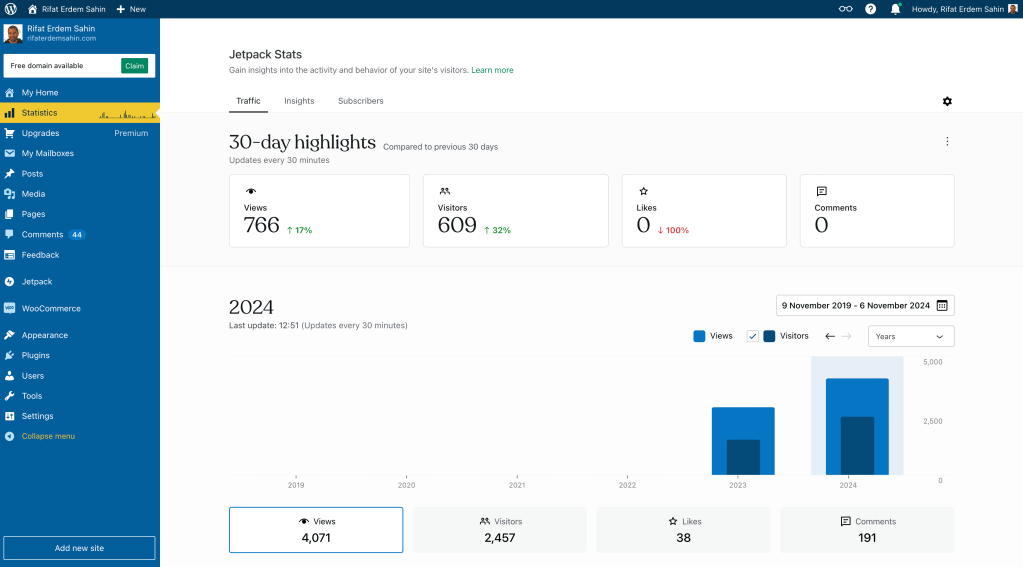
💡 My Favorite Insight: Watching trends over time can reveal seasonal spikes or changes in audience behavior—great for planning your next big post! 🚀
-
Highlight Trends – Capture monthly stats and compare over time to see growth.
-
Pinpoint Changes – Note any sudden dips or spikes in visitors and track down what caused them.
-
Save Key Insights – When a post performs exceptionally well, take a screenshot of its stats for future reference.
🎯 Final Thoughts
Regularly tracking your WordPress Stats can be a game-changer in understanding what makes your audience tick. With these insights, you’ll be able to craft better content, reach new readers, and grow your site’s influence! 🚀
🔗 Connect with me:
Let’s keep growing together! 👥
Imported from rifaterdemsahin.com · 2025