Unlocking AI Efficiency with Text Blaze and Formula Writing
📝 Blog Post: Unlocking AI Efficiency with Text Blaze and Formula Writing
🚀 Have you ever wanted to speed up your workflow and make complex calculations a breeze? Enter Text Blaze—a tool that integrates seamlessly with your workflow, offering features that not only enhance text automation but also bring AI-powered formula writing to your fingertips. In this post, I'll walk you through how this feature can level up your efficiency.
💡 What I Want to Achieve:
One of the standout features of Text Blaze is its AI writing capability. By integrating formulas directly into your templates, you can automate repetitive tasks and calculations effortlessly. Here’s how you can use it:
-
Define Your Variables: Set up placeholders that Text Blaze can recognize and fill in for you. For example, you can create a placeholder for common tasks like "client name" or "due date."
-
Formulas at Your Fingertips: Want to calculate numbers on the fly? Use simple formulas like
{{=price * quantity}}to get the total cost in seconds! You can also combine text-based logic, making this a powerhouse for any professional dealing with complex workflows. -
AI-Powered Suggestions: The AI writing feature helps you generate ideas, enhance the clarity of your writing, and improve your formulas. Need to convert numbers into percentages or apply conditional logic? Just type a few keywords, and Text Blaze will take care of the rest!
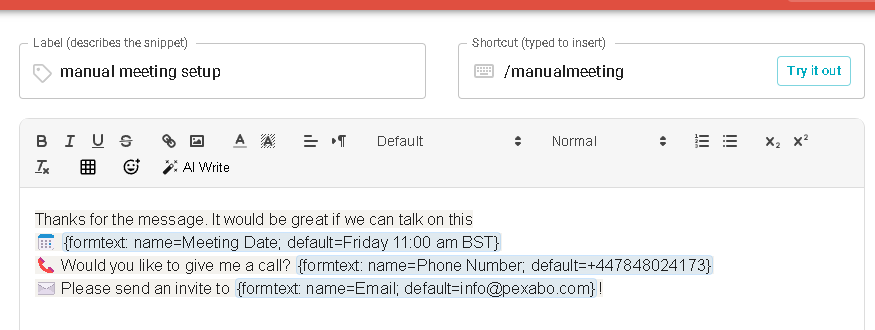
Here’s a screenshot of how you can pause for input, ensuring you’re fully in control of your output:

🚀 Pro Tip: Pauses let you prompt for manual input, giving you even more flexibility! Whether you're using it for customer service responses or complex reports, this feature will save you loads of time.
🎯 Use Case: Automating Client Invoices
Imagine you need to send out client invoices regularly. With Text Blaze, you can automate this task by pre-defining variables like the client's name, service provided, and total cost. By adding simple formulas, the invoice is calculated instantly without you lifting a finger.
Dear {{client_name}},
Thank you for using our service! Your total due for {{service_description}} is ${{=service_price * service_quantity}}. Please pay by {{due_date}}.
Best regards,
Your Team
🔧 How I Use It in My Workflow
I personally use Text Blaze for writing blog posts, creating reports, and even generating code snippets. The AI-powered formula feature makes it easy to combine automation with the flexibility to pause and tweak each step.
🔗 Connect with me and learn more about how you can integrate AI into your workflow:
-
💼 LinkedIn: https://www.linkedin.com/in/rifaterdemsahin/
-
🐦 Twitter: https://x.com/rifaterdemsahin
-
🎥 YouTube: https://www.youtube.com/@RifatErdemSahin
-
💻 GitHub: https://github.com/rifaterdemsahin
🚀 Ready to boost your productivity? Give Text Blaze a try, and let AI handle the heavy lifting while you focus on what really matters!
Imported from rifaterdemsahin.com · 2025