Iterations with GPT
To resolve the issue of exceeding the maximum context length in Logic Apps, you need to reduce the size of the input data (messages or completion) to fit within the allowed limit. Here’s how you can do this:
1. Trim or Summarize Text Content
-
Summarization: Use a summarization model to condense long messages or responses. This reduces the token count while retaining essential information.
-
Manual Trimming: Manually shorten the text by removing unnecessary information, verbose language, or redundant content.
2. Break Down the Task
-
Chunking: Split the input text into smaller chunks and process them individually. This helps to keep each message within the token limit.
-
Multiple Calls: Instead of handling a large text in one go, you can break it into smaller parts and make multiple API calls or use multiple Logic App actions.
3. Optimize JSON Structure
-
Minify JSON: Remove unnecessary whitespace, indentation, and line breaks in the JSON structure to reduce the number of tokens.
-
Reduce Data Complexity: If your JSON includes nested structures or large arrays, consider flattening them or reducing the number of elements to decrease the token count.
4. Compress Data Before Sending
-
String Compression: If the content can be compressed without losing information, compress the string before sending and decompress it after receiving.
-
Data Encoding: Use more efficient encoding methods (e.g., Base64 instead of plain text) to reduce the token size.
5. Adjust Model Parameters
-
Reduce Completion Length: If the completion length is too long, consider requesting a shorter completion.
-
Context Window Optimization: Carefully craft the context to include only the most relevant messages, trimming the history or unnecessary context data.
6. Use a Different Model
- If possible, consider using a model with a larger context window, if available, or one that is optimized for longer inputs.
By implementing one or more of these strategies, you can reduce the number of tokens and successfully process your request within the allowed limits in Logic Apps.
SECOND QUESTION
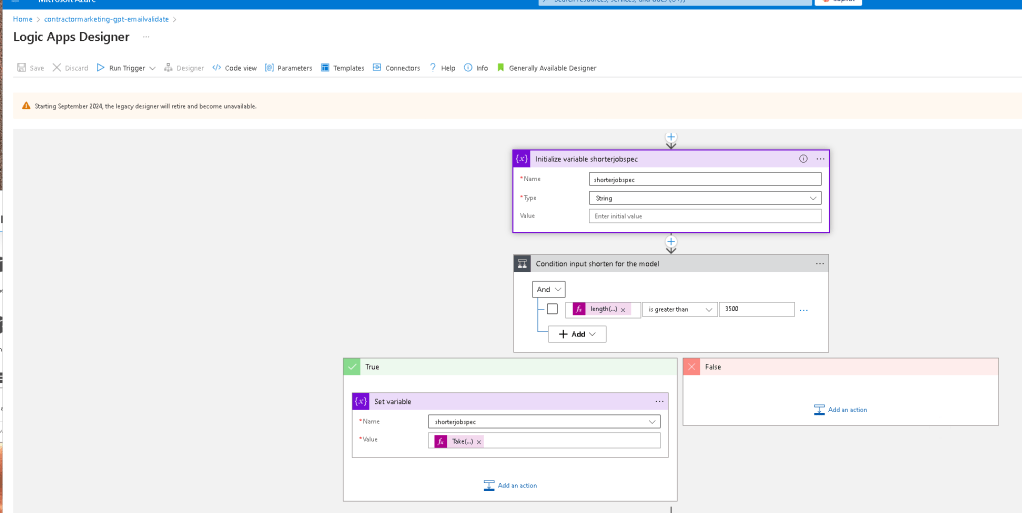
To get the first 3500 items from a list in Logic Apps and set them into an array variable, you can follow these steps:
Steps:
-
Initialize the Array Variable:
-
Start by initializing an array variable that will store the first 3500 items from your list.
-
Use the
SelectAction (Optional): -
If you need to transform or filter the items, you can use the
Selectaction before proceeding to extract the first 3500 items. -
Use the
TakeFunction: -
Logic Apps provides the
Takefunction, which you can use within an expression to extract a specific number of items from an array.
Example Implementation:
-
Initialize the Array Variable:
-
Add a "Initialize variable" action to your Logic App.
-
Set the type to
Array. -
Use the
TakeFunction: -
In the "Value" field of the variable, use the
Takefunction to extract the first 3500 items from your list. Here's an example expression:
take(
Replace <YourArray> with the actual array from which you want to take the first 3500 items.
-
Set the Array Variable:
-
Assign the output of the
Takefunction to your array variable.
Example Expression in Logic Apps:
If your list is stored in a variable called myList, the expression would look like this:
"take(variables('myList'), 3500)"
Full Example:
-
Initialize
myList: -
Initialize your
myListarray with the data or assign it from previous actions. -
Initialize
first3500Items: -
Initialize another array variable called
first3500Items. -
Set the Value Using
Take: -
Use the following expression in the "Set variable" action to assign the first 3500 items:
take(variables('myList'), 3500)
-
Use
first3500Itemsas Needed: -
Now you can use the
first3500Itemsarray variable in your subsequent Logic Apps actions.
By using this approach, you'll successfully extract and store the first 3500 items from your list into an array variable in Logic Apps.
Imported from rifaterdemsahin.com · 2025