More Free: Unleash Your Creativity with Our New Features in Microsoft OneNote!
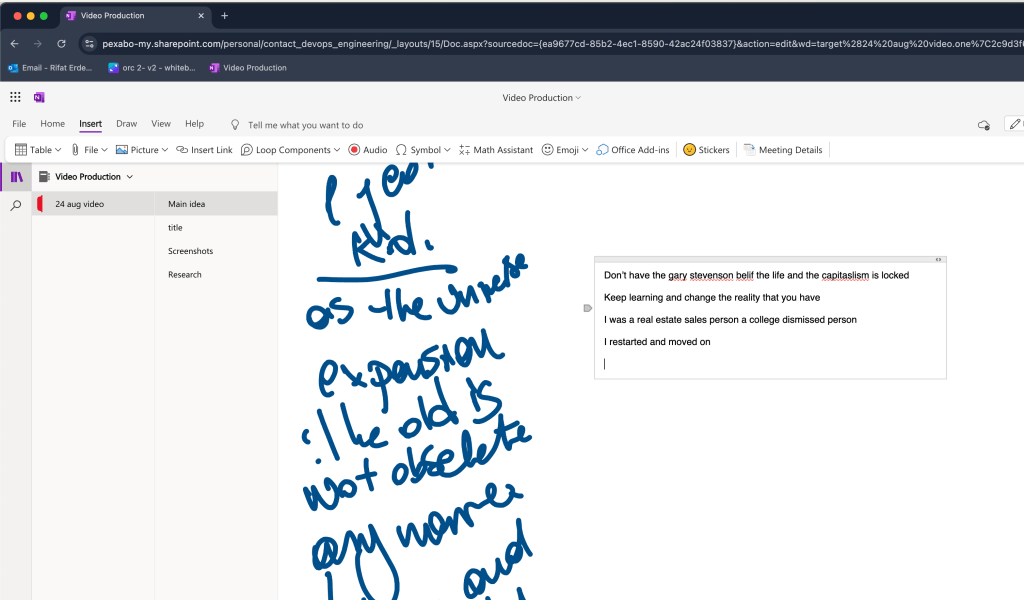
Are you ready to explore your creativity like never before? We’ve got some exciting updates that will revolutionize how you use Microsoft OneNote! In this blog post, I’ll take you through all the new features that have transformed my video production process, giving me even more freedom to express myself.
Whether you're an artist, a designer, or just someone who loves to create, these updates are designed to elevate your experience. And the best part? You can add your own screenshots and drawings to make your creative journey even more personalized! You can even add videos to your notes. For some reason, I always gave up on OneNote, but with the Office 365 membership at [email protected], I think that’s about to change.
New Pages to Spark Your Imagination
I’ve added brand-new pages to my initial idea platform, giving you more space to bring your ideas to life. These pages, mostly created with Canva, can be customized to fit any project you have in mind, from sketching rough ideas to organizing a full-blown mood board. Whether you're working on a new design, planning a video, or brainstorming your next big (or small) project, these new pages are your blank canvas. With so many projects on my plate and limited time, this feature helps me stay organized and inspired.
Use It as a Mood Board
One of the coolest things about our new pages is that they can be easily transformed into mood boards. A mood board is a fantastic tool for visualizing ideas, and with our new feature, it's easier than ever. Simply drag and drop your images, drawings, and even screenshots to create a collage that represents your vision. It’s perfect for getting a hands-on start with any project and ensuring that all your creative ideas are in one place. And remember, engaging your amygdala through creative stimulation can kickstart your imagination and drive.
iPad and Drawing Pen: Your New Best Friends
Got an iPad and a drawing pen? You’re in for a treat! Our platform is fully optimized for use with these tools, allowing you to sketch, draw, and annotate directly on your device. Whether you're a digital artist or just love doodling, the seamless integration of the iPad and drawing pen will make your creative process smoother and more enjoyable. It's like having a digital sketchbook that you can take anywhere! This feature is perfect for making notes and visual annotations on the go, ensuring you never lose a spark of inspiration.
Diverge and Converge: A New Way to Brainstorm
At the start of any project, it's essential to explore different ideas and directions. That's why we're encouraging you to diverge at the beginning—don’t be afraid to think outside the box and explore multiple concepts. With our new features, you can easily map out all your ideas on different pages and later converge on the best ones. This process ensures that you're not limiting yourself and that every possibility is considered. I’ve learned that this continuous process of diverging and converging is crucial in my video production workflow, ensuring that I refine and perfect my ideas before finalizing them.
Make Your Video Ideas Stand Out
Videos are a powerful way to communicate ideas, and we believe the process of creating them should be just as exciting. Our platform’s new features are designed to help you plan and storyboard your videos in a way that's both fun and effective. Whether you're sketching out scenes, adding notes, or organizing your ideas, you'll find that the creative process flows naturally. Remember, the key is to keep your video ideas interesting and engaging from the start. Love your idea first, and then others will follow—creativity begins with you and ends with the audience.
Start Creating Today!
With these new updates, we can't wait to see what you'll create. From mood boards to videos, the possibilities are endless. So grab your iPad, pick up your drawing pen, and dive into your next creative adventure with more freedom than ever before!
Screenshots and Drawings Coming Soon!
Stay tuned for a follow-up post where we’ll showcase some fantastic examples and provide step-by-step guides on how to make the most of these new features. We can’t wait to see what you come up with!
Let your creativity run wild, and remember: the only limit is your imagination! The self-learning journey of video production is what keeps you going.
References
For the blog post titled "More Free: Unleash Your Creativity with Our New Features in Microsoft OneNote!", here are some potential web references that could be useful to support the content and provide readers with more information:
-
Microsoft OneNote Official Website
-
This is the primary source for all updates, features, and detailed information about Microsoft OneNote. You can find information about new features, tutorials, and guides on how to use OneNote effectively.
-
Link: Microsoft OneNote
-
Office 365 Subscription Benefits
-
To understand the benefits and additional features available with an Office 365 subscription, including access to premium features of OneNote and integration with other Microsoft apps.
-
Link: Office 365 Benefits
-
Microsoft OneNote Help & Learning Center
-
This resource offers comprehensive guides and learning materials on how to use OneNote, including creating mood boards, integrating with devices like iPads and drawing pens, and more advanced features.
-
Link: OneNote Help & Learning
-
Canva for Designing Mood Boards and Other Creative Projects
-
Since the blog post mentions using Canva for designing pages and mood boards, linking to Canva’s site or its specific resources on creating mood boards can provide readers with a deeper understanding.
-
Link: Canva Mood Boards
-
Apple iPad and Pencil Integration with Microsoft OneNote
-
Articles or support pages that discuss how to use OneNote with an iPad and Apple Pencil. This could help readers understand how to use these tools for drawing, sketching, and annotating directly in OneNote.
-
Video Storyboarding and Planning Tips
-
Resources that offer tips on planning and storyboarding videos can be useful to complement the discussion on using OneNote for video production.
-
Link: Video Storyboarding Tips
-
Creative Brainstorming Techniques
-
Articles or blogs about brainstorming techniques, particularly the “diverge and converge” method mentioned in the blog post. These resources can provide more background and practical advice on creative brainstorming.
-
Link: Brainstorming Techniques
These references provide additional context and detailed information that will help readers fully utilize the new features of Microsoft OneNote, understand the integration with devices, and explore creative tools and techniques.
Main Features
-
Dictate
-
Pages
-
Practical Share
-
Video Embed
-
Infinite Canvas
-
Sort ideas
Imported from rifaterdemsahin.com · 2025