📝 Why Use Two Messages in Git Commits: A Self-Learning Framework in CodeSpaces
🚀 Overview
When working on projects, it’s easy to write a quick Git commit message and move on, but by using two messages in Git commits—one for the title and another for the details—you add structure and clarity to your commit history. Here’s why breaking down your message with -m twice matters, and how you can start implementing this technique for cleaner, more understandable code updates.
💡 Why Two Messages?
-
🎯 Clarity at a Glance: The first
-mmessage serves as a quick summary of the change. This is especially helpful for anyone scanning through the history; they can quickly understand the main idea without digging into the details. -
🔍 Context in Detail: The second
-mmessage provides additional context. This can include: -
Why the change was made
-
Specific parts of the code affected
-
Any nuances of implementation With both, you give fellow developers or future you a clear snapshot of both the what and the why behind each update.
📋 Sample Git Command in Action
Here’s how to structure your Git commands to use both messages:
git pull
git add .
git commit -m "<
git push
clear
In this example:
-
The first message (
"<<SelfLearning Framework CodeSpaces>>") acts as the headline. -
The second message (
"Update with 2 lines") provides extra details, which can help later for troubleshooting or revisiting changes.
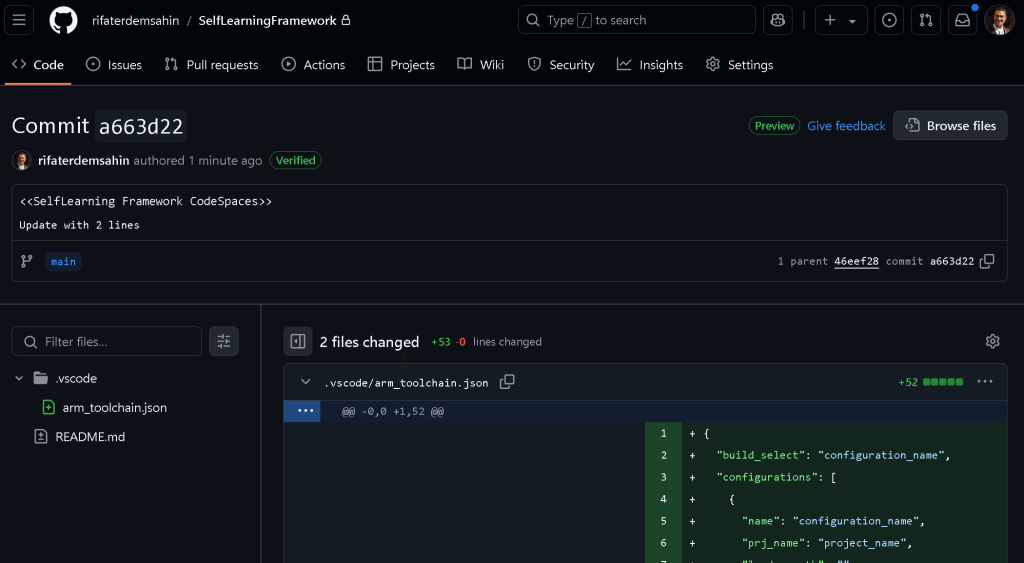
To make it even clearer, here’s a screenshot (imagine a screenshot here showing the terminal with the commands executed) where you can see the command in action and its output after each stage. Including screenshots helps reinforce the visual learning process for those working on their Git skills.
🔗 Connect with Me
I’m always open to discussions, feedback, or collaborating on new ideas! Feel free to reach out:
-
💼 LinkedIn: Connect on LinkedIn
-
🐦 Twitter: Follow me on Twitter
-
🎥 YouTube: Subscribe on YouTube
-
💻 GitHub: Check out my GitHub
By using two messages in Git commits, you’re not only organizing your own workflow better but also making your code history a friendlier place for collaborators and future maintainers. Happy coding! 👩💻
Imported from rifaterdemsahin.com · 2025