📝 Mastering git diff: A Must-Have Skill for Developers 🚀
In the world of development, every line of code matters. As you build, debug, and refine your project, knowing what has changed in your codebase and understanding how those changes impact the system is crucial. That’s where the git diff command becomes your best friend! 🛠️
💡 What is git diff?
git diff is a command-line tool that shows you changes between different commits, branches, or working directories. Whether you’re working solo or in a collaborative environment, it keeps you aware of what’s new, what’s modified, and what might need a second look.
To compare with your file set that is working at thei smoment.
🚀 Quick Snapshot: Imagine git diff as the virtual detective for your codebase, identifying differences and helping you keep track of code history.

🤔 Why Use git diff?
1. Debugging with Precision 🕵️
- Before running your code, use
git diffto ensure there are no unexpected changes that could cause bugs or errors. For example, a stray line of code can cause a lot of trouble, andgit diffcan spot that right away!
2. Tracking Code Review 👀
- Need to collaborate?
git diffallows you to see every little tweak made in a shared branch. You can quickly catch mistakes, give constructive feedback, and ensure everyone is on the same page.
3. Maintaining Code Quality 🧹
- Stay on top of coding standards! With
git diff, you can catch unwanted code or accidentally committed debug statements, keeping your project clean and professional.
4. Understanding Code Evolution 🌱
- When working on a feature that changes multiple files,
git diffhelps you see how your code has evolved. It’s perfect for referencing as you switch tasks or even after a short break.
🚀 How to Use git diff for Maximum Impact
1. Basic Diff: Check changes in your current working directory
git diff
See differences between your current code and the last commit.
2. Diff Between Commits: Compare changes between two commits
git diff commit1 commit2
E.g., git diff abc123 def456 to see changes from one version to another.
3. Diff Between Branches: Track changes in a feature branch before merging
git diff main feature-branch
See what's different between branches to avoid merge conflicts!
🎉 Pro Tip: Use git diff --staged to only see staged changes before you commit, keeping your workflow smooth and avoiding surprises.
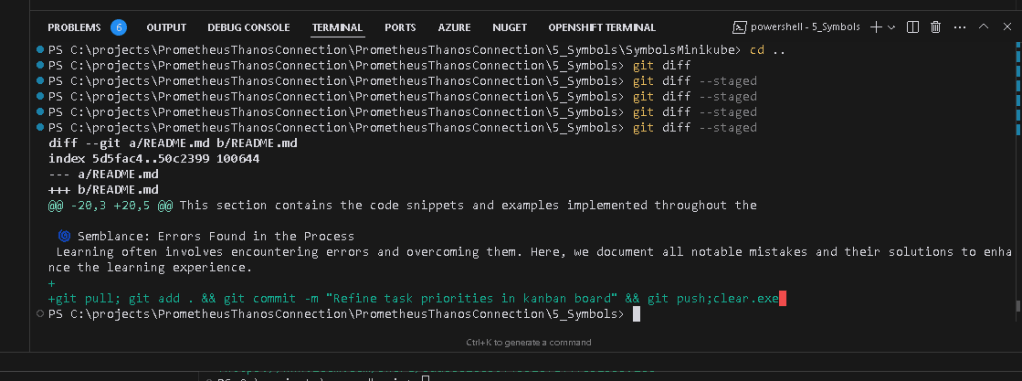
A visual can be incredibly helpful! Here’s an example of git diff in action:
🚀 Ready to Master Your Codebase?
git diff is a powerful tool to help you understand your code changes, keep track of project evolution, and improve collaboration. Start using it today to level up your workflow! 🔥
🔗 Connect with me:
Imported from rifaterdemsahin.com · 2025