Understanding VMkernel and Fault Tolerance 🛡️🚀
In today's IT landscape, ensuring high availability and fault tolerance (FT) in virtualized environments is essential. One crucial element that enables these is VMkernel, a specialized part of VMware's infrastructure designed to manage essential system-level tasks. Let’s dive into why VMkernel is so crucial to fault tolerance and how it facilitates seamless communication and protection between primary and secondary virtual machines (VMs). 🖥️✨
What is VMkernel? 💡
The VMkernel is VMware's dedicated OS that manages various virtualization tasks, such as:
-
Resource allocation across VMs
-
Memory and CPU management 🧠
-
Network input/output
-
Storage management
Its role is essentially to handle all the "under-the-hood" operations that keep the virtualized environment stable and efficient. For fault tolerance, the VMkernel is vital because it manages the connection between primary and secondary VMs to ensure they stay in sync.
How VMkernel Enables Fault Tolerance 🛡️
Fault tolerance in VMware relies on a primary-secondary model. In this setup, the primary VM is the active instance that users interact with, while the secondary VM stands by in real-time replication. Here’s where VMkernel shines: it oversees communication and synchronization between these two VMs, ensuring:
-
Continuous Monitoring 🕵️♂️: The VMkernel monitors the health of the primary VM. If there’s a failure, it instantly triggers a failover.
-
Seamless Failover 🔄: When the primary VM encounters issues, the VMkernel ensures that the secondary VM takes over without disrupting users.
-
Data Integrity 🔐: By keeping the primary and secondary VMs in sync, VMkernel helps protect data from corruption or loss during a failover.
This process is automated and immediate, creating a transparent experience for end-users.
Setting Up Fault Tolerance with VMkernel 🛠️
Setting up fault tolerance with VMkernel is straightforward in VMware environments. Here’s a quick step-by-step guide:
-
Enable Fault Tolerance (FT): In the VM settings, go to Availability and enable Fault Tolerance.
-
Configure VMkernel Network: Ensure the VMkernel network is set up for fault tolerance traffic. This is key to maintaining low latency between primary and secondary VMs.
-
Allocate Sufficient Resources: FT requires additional resources for redundancy, so make sure your infrastructure can support both VMs effectively.
-
Test the Setup: Use testing tools to simulate failover scenarios and confirm that the secondary VM can seamlessly take over when needed.
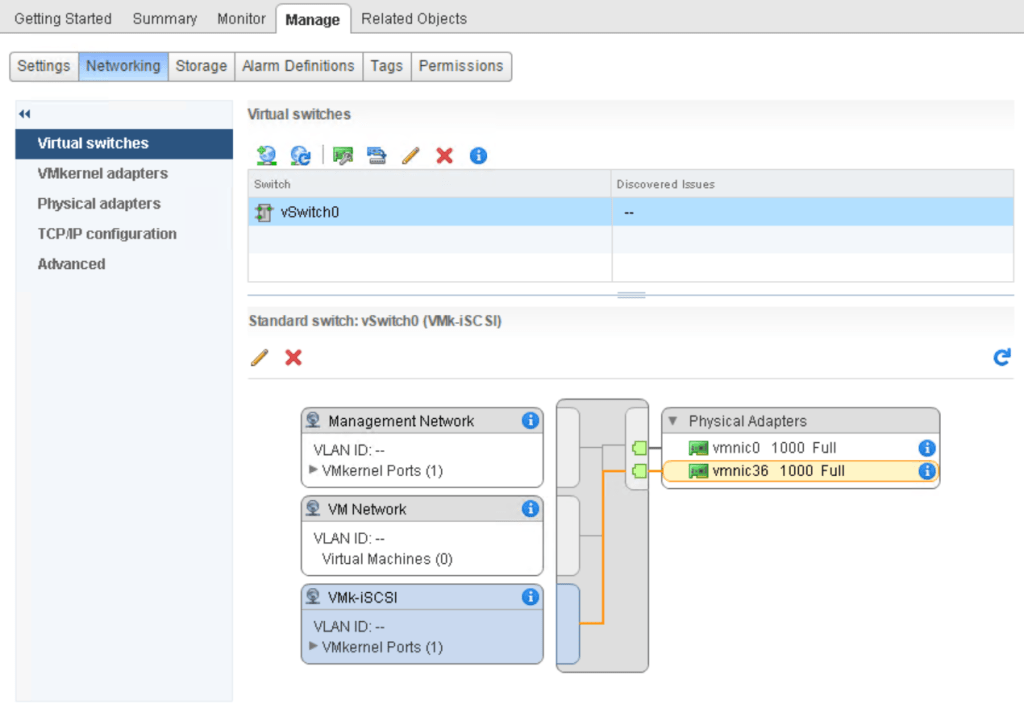
Consider this screenshot pause to visualize your FT setup! Capture your VMkernel network settings and Fault Tolerance configuration screen. These visuals can be useful as you implement FT in real-time!
Why VMkernel is the Backbone of Fault Tolerance
VMkernel’s role in fault tolerance extends beyond just managing the primary and secondary VMs. It’s the communication hub that makes sure the backup VM is always prepared to step in when needed. By doing so, VMkernel supports:
-
Uninterrupted Operations 🕰️
-
Protection against Hardware Failures 💥
-
Increased Uptime ⏫
Conclusion ✨
In VMware environments, VMkernel's contribution to fault tolerance cannot be overstated. By managing critical communication between primary and secondary VMs, it ensures that businesses can operate with confidence, knowing that they have a reliable backup if their primary VM experiences downtime. 🛡️🖥️
🔗 Connect with me:
-
💼 LinkedIn: Rifat Erdem Sahin
-
🐦 Twitter: @rifaterdemsahin
-
🎥 YouTube: Rifat Erdem Sahin
-
💻 GitHub: @rifaterdemsahin
Imported from rifaterdemsahin.com · 2025