🚀 How I Save Time Using Text Blaze Snippets
🚀
In today's fast-paced digital world, every second counts, especially when you're juggling multiple projects and trying to stay productive. Enter Text Blaze—my go-to tool for saving time and increasing efficiency by using custom snippets for repetitive tasks.
📝 Why Text Blaze?
Text Blaze is a powerful Chrome extension that allows you to create snippets or templates that can be expanded with just a few keystrokes. This is a game-changer for:
-
Composing emails: Save a template once and reuse it whenever you need.
-
Form filling: Automatically input frequently used information, like addresses or signatures.
-
Coding: Use snippets to quickly input repetitive code structures.
🛠️ My Favorite Snippets
Here's a quick breakdown of how I use Text Blaze:
-
💬 Quick Responses: Instead of typing out similar replies, I set up Text Blaze to automatically generate my most frequent responses in just a few clicks.
-
🔄 Dynamic Placeholders: With Text Blaze, I can set up placeholders in my templates for client names, dates, and other variables. This makes sending personalized emails faster than ever.
-
📋 Data Entry: For tasks requiring repeated data entry, such as project management updates, snippets save me a significant amount of time.
Here’s an example snippet that I often use for my blog drafts:
/blogpost
Title: {formtext: default="Enter your title here"}
Introduction: {formtextarea: default="Write your intro here..."}
Key points:
1. {formtext: default="First point"}
2. {formtext: default="Second point"}
Conclusion: {formtextarea: default="Write your conclusion here..."}
🚀 My Workflow (with a Pause for Screenshot)
Whenever I’m working on a blog or email, I simply:
-
Activate the snippet with a shortcut.
-
Watch as the text auto-fills, letting me focus on the creative parts of writing.
-
Add personalized details to ensure every message is tailored.
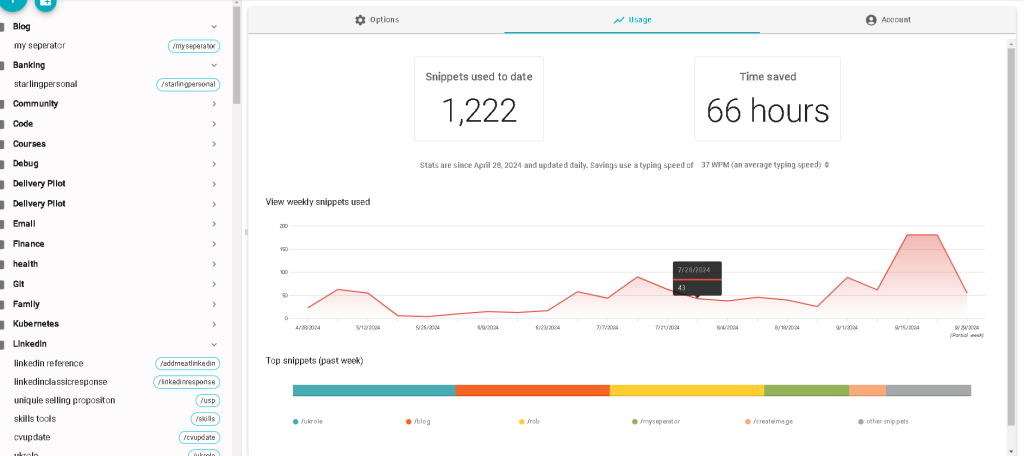
🔎 Here's a screenshot showing Text Blaze in action:

💡 What I’ve Achieved
By incorporating Text Blaze into my workflow, I’ve:
-
Saved hours of time each week.
-
Improved consistency in my communications.
-
Reduced mental load by minimizing repetitive tasks.
With all the extra time, I can now focus on more strategic tasks like video production, coding, and brainstorming new projects!
🔗 Connect with me:
-
💼 LinkedIn: https://www.linkedin.com/in/rifaterdemsahin/
-
🐦 Twitter: https://x.com/rifaterdemsahin
-
🎥 YouTube: https://www.youtube.com/@RifatErdemSahin
-
💻 GitHub: https://github.com/rifaterdemsahin
Do you use Text Blaze or similar tools to streamline your workflow? Let me know in the comments! 👇
Imported from rifaterdemsahin.com · 2025