🚀 Mastering Kubernetes: A Visual Guide to Nodes, Clusters & Pods!
Welcome to this hands-on, visual guide on understanding Kubernetes nodes, clusters, and pods! Kubernetes is an incredible tool for orchestrating containers, but it can feel a bit abstract. This post breaks it down with screenshots, explanations, and pauses, giving you the confidence to handle Kubernetes like a pro.
🗺️ The Big Picture: Nodes, Clusters & Pods
-
Kubernetes Cluster 🌐
Think of a cluster as a team of workers that manages your applications. It’s the central Kubernetes setup that includes nodes (workers) and pods (workload containers). -
Nodes 🖥️
A node is a worker machine in the cluster—either virtual or physical. Each node contains the necessary services to run pods, including the container runtime, Kubelet, and Kube-proxy. -
Pods 📦
A pod is the smallest, most basic unit in Kubernetes. Pods host your application containers and share resources like storage and networking.
🌐 Let’s Visualize: A Simple Kubernetes Setup
Let’s start by visualizing a simple setup with one master node and a couple of worker nodes. Here’s what it looks like:
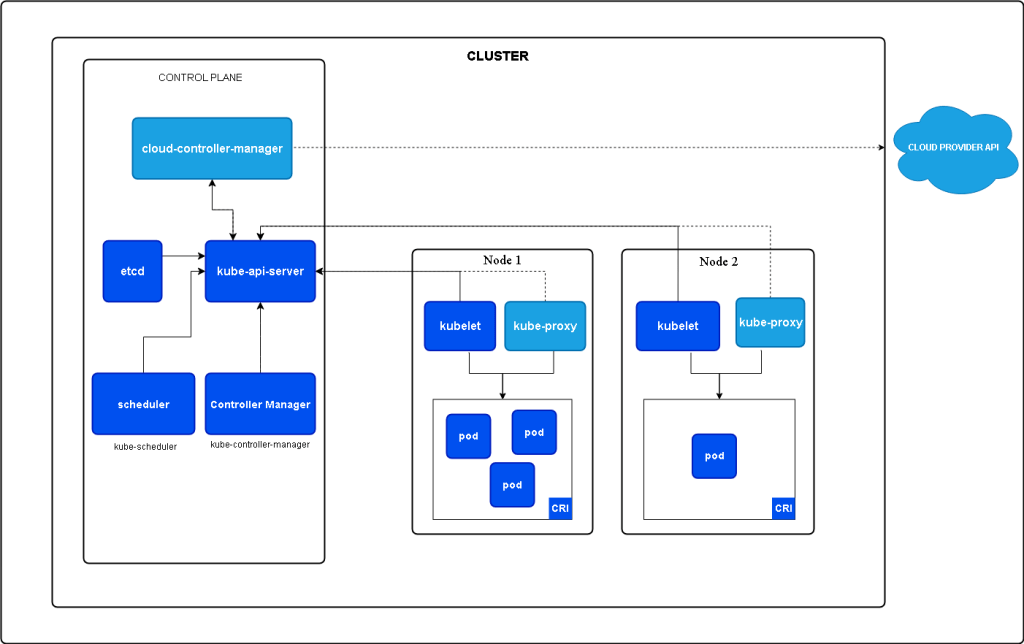
This screenshot shows a basic cluster with a control plane (master node) managing several worker nodes.
🚀 Dive into Pods
When you deploy an app in Kubernetes, it gets wrapped into a pod. Here’s a breakdown:
-
Each pod contains your application’s container.
-
Pods are distributed across nodes by the Kubernetes scheduler.
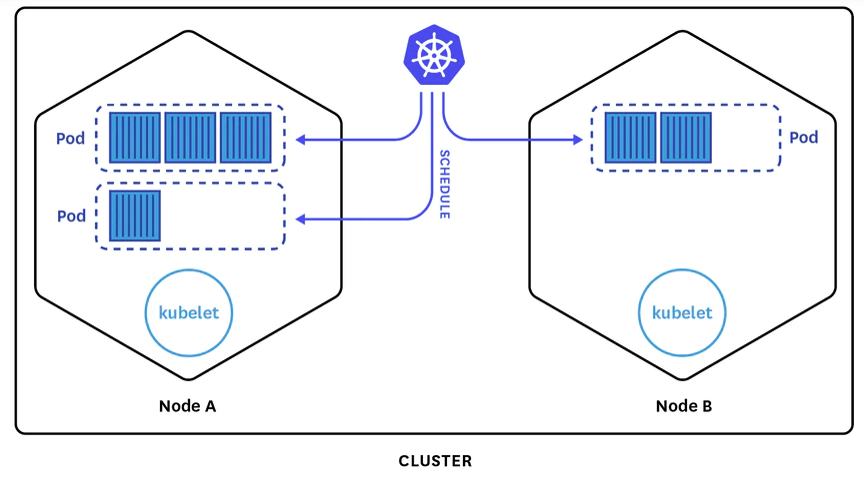
🔄 Scaling Up & Down with Pods
Kubernetes lets you scale pods up and down based on demand, keeping resource usage optimized and costs down. This scaling is managed by replica sets and deployments, ensuring your app has just the right amount of resources.
📈 Visualizing the Flow in Your Kubernetes Cluster
Here’s a visual to show how pods, nodes, and the cluster work together:
-
The control plane (master node) assigns work to the nodes.
-
Nodes then run the pods containing the app containers.
-
If a pod fails, Kubernetes automatically reschedules it, ensuring high availability.
🧩 Kubernetes Pods & Networking
Networking in Kubernetes connects pods across nodes and provides access to the outside world. Services help expose your pods to traffic, allowing them to be accessed by other applications.
📌 Wrap-Up: Kubernetes Simplified
Kubernetes nodes, clusters, and pods create a powerful environment to run apps at scale. By visualizing how they interact, you’re ready to dive deeper into Kubernetes and start building more resilient applications!
References
https://www.fairwinds.com/blog/getting-started-with-kubernetes-architecture-basics-definitions
                https://kubernetes.io/docs/concepts/architecture/
Feel free to connect if you have questions or want to share your Kubernetes journey!
-
💼 LinkedIn: Rifat Erdem Sahin
-
🐦 Twitter: @rifaterdemsahin
-
🎥 YouTube: Rifat Erdem Sahin
-
💻 GitHub: rifaterdemsahin
Happy Kubernetes-ing! 🚀
Imported from rifaterdemsahin.com · 2025