🚀 Fixing Minikube Connection Issues to Kubernetes API Server
If you're encountering errors related to Minikube's inability to connect to the Kubernetes API server, don't worry! Below are a few steps to help you troubleshoot and resolve the issue, so you can get your Kubernetes cluster up and running in no time. Let’s dive in! 💡
🛠 1. Check Docker Setup
Minikube often uses Docker to run Kubernetes clusters. If Docker is not running or configured correctly, Minikube may fail to start. To check the current state of your Docker setup, run:
docker ps
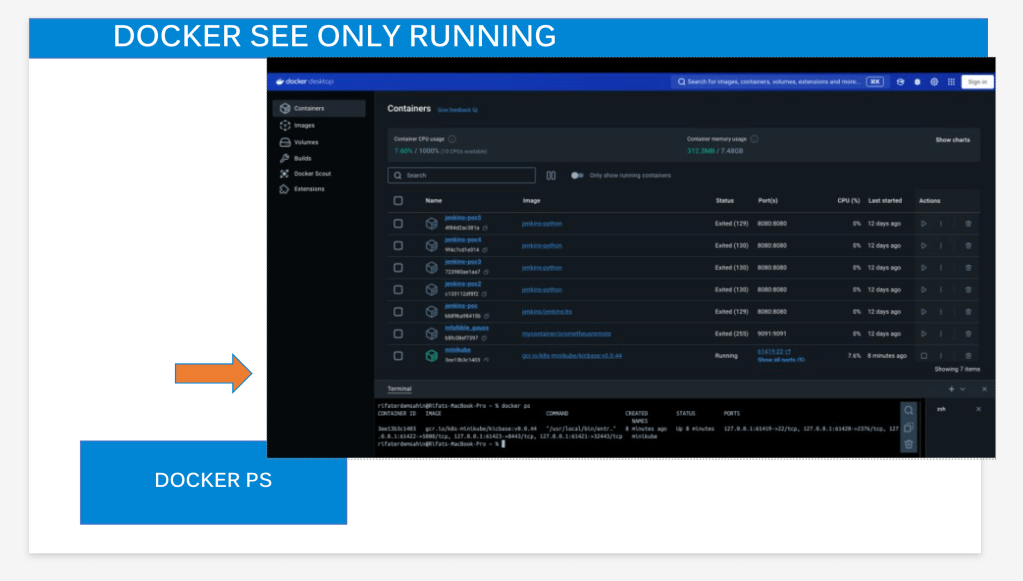
This will show you a list of active containers. If the containers related to Minikube aren't running, restart Docker with:
sudo systemctl restart docker
Here’s a quick screenshot of what you should see if Docker is functioning properly:

🔄 2. Reset Minikube
If Docker is fine but you're still facing issues, it might help to reset Minikube. This will stop the current instance, delete any existing configurations, and start fresh:
minikube stop
minikube delete
minikube start
Make sure that any prior issues with your cluster configuration are cleared out during the reset.
📦 3. Update Minikube
Another common problem is outdated versions of Minikube. Check if you're using the latest version and update if necessary. The error message already suggests there's a newer version available (v1.34.0). Update Minikube using Homebrew with:
brew upgrade minikube
Once updated, run minikube start again and see if the issue is resolved.
🔍 4. Validate Kubernetes Configuration Files
Sometimes, errors occur due to invalid configurations in Kubernetes files. The error logs may indicate problems validating OpenAPI data. You can skip the validation step by running the following command:
sudo KUBECONFIG=/var/lib/minikube/kubeconfig /var/lib/minikube/binaries/v1.30.0/kubectl apply --force -f /etc/kubernetes/addons/storage-provisioner.yaml --validate=false
This forces Kubernetes to apply the configuration without checking for validation errors.
🔧 5. Increase Resource Allocation
If your system's resources are limited, Kubernetes might fail to start properly. To increase CPU and memory allocation for Minikube, run:
minikube config set memory 8192
minikube config set cpus 4
minikube start
Increasing these values can help ensure that your Kubernetes cluster has enough resources to run smoothly.
🚇 6. Run Minikube Tunnel
For network-related errors, try running Minikube with a tunnel. This will allow ingress resources to be available locally:
minikube tunnel
This should help resolve issues related to accessing your Minikube services through localhost or external IPs.
💬 Wrap-Up
Following these steps should help you resolve the connectivity issue with the Kubernetes API server in Minikube. If you encounter additional issues, feel free to drop me a message, and I'll be happy to help!
🔗 Connect with me:
-
💼 LinkedIn: https://www.linkedin.com/in/rifaterdemsahin/
-
🐦 Twitter: https://x.com/rifaterdemsahin
-
🎥 YouTube: https://www.youtube.com/@RifatErdemSahin
-
💻 GitHub: https://github.com/rifaterdemsahin
Stay tuned for more tips and tricks in the Kubernetes world! 💻
Imported from rifaterdemsahin.com · 2025