Synology Archieve Costs
One off
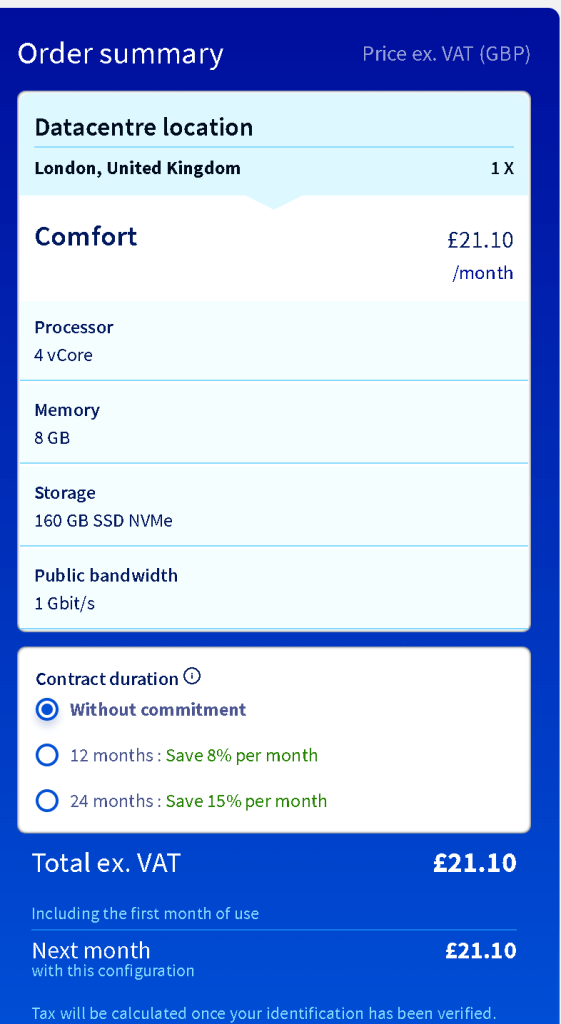
Step 1: rent the machine
Step 2: download from takeout
Step3: Download from vpn to laptop
Step4: Upload to nas
Step5: Release the cloud
SElect D
🖥️ Which Linux Distro Comes with RDP and a UI? 🤔
Are you looking for a Linux distribution that comes with a remote desktop protocol (RDP) and a graphical user interface (UI) out of the box? You're in the right place! Let's break down the most popular free Linux distributions and see which ones fit your needs. 🚀
🆓 Popular Free Linux Distributions
DistributionVersionUI Included?RDP Support?UbuntuLatest✅ Yes (GNOME/KDE/Xfce)⚠️ No (RDP needs manual setup)DebianLatest✅ Yes (GNOME/KDE/Xfce)⚠️ No (RDP needs manual setup)FedoraLatest✅ Yes (GNOME/KDE)⚠️ No (RDP needs manual setup)CentOSVersion 7⚠️ Minimal UI (needs manual installation)❌ No (requires manual setup)AlmaLinuxLatest⚠️ Minimal UI (optional)❌ No (manual setup required)Rocky LinuxLatest⚠️ Minimal UI (optional)❌ No (manual setup required)
🖼️ Ubuntu – Best for UI Out of the Box
If you want a full desktop experience with an easy setup, Ubuntu is your best bet. It comes with GNOME by default, but you can also choose KDE (Kubuntu), Xfce (Xubuntu), or other flavours.
🔌 How to Enable RDP on Linux?
Most Linux distros don’t come with RDP pre-installed. However, you can set it up easily using:
-
XRDP (for Windows-style RDP)
-
VNC Server (for remote desktop access)
-
AnyDesk / TeamViewer (third-party solutions)
📌 Ubuntu Quick Setup for RDP:
sudo apt update && sudo apt install xrdp -y
sudo systemctl enable --now xrdp
💡 Pro Tip: If you’re running a server version (without UI), install a desktop environment first:
sudo apt install ubuntu-desktop -y # GNOME
sudo apt install kubuntu-desktop -y # KDE Plasma
sudo apt install xubuntu-desktop -y # Xfce
🚀 My Recommendation
If you want a hassle-free experience with both UI and remote desktop support, go for Ubuntu with XRDP. Fedora is also a solid choice, but it requires additional RDP setup.
For servers, AlmaLinux and Rocky Linux are great, but they lack a pre-installed UI and require extra configuration for remote access.
📸 Screenshot Pause! 🛑 Before making changes, always take a screenshot of your terminal or desktop settings. That way, you can revert back if needed. 🔥
Let me know which one you’re using and if you need help setting up RDP! 😃👇
🔗 Connect with me:
💼 LinkedIn
🐦 Twitter
🎥 YouTube
💻 GitHub
Imported from rifaterdemsahin.com · 2025