Inverting the container inside the Openshift for Monitoring
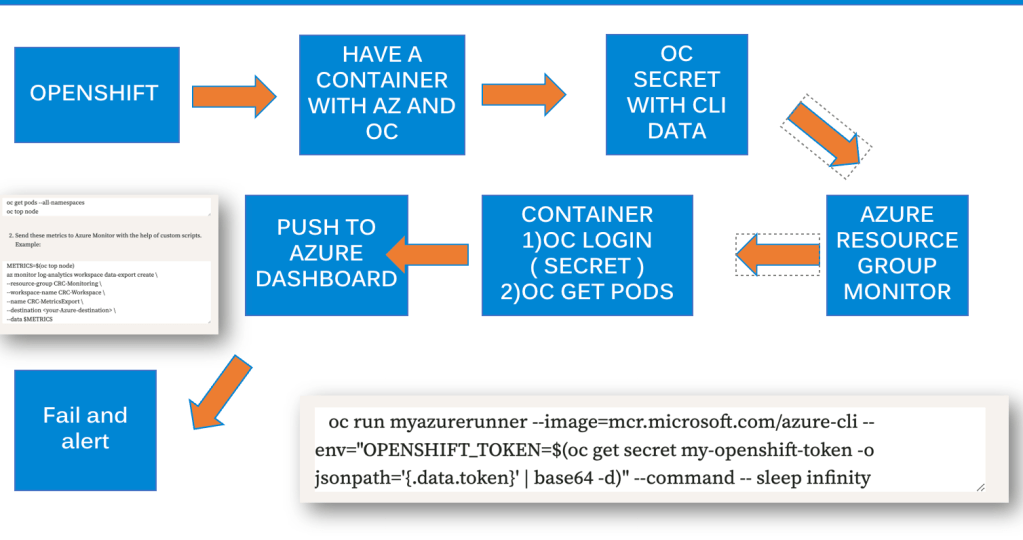
To connect a container running inside your CRC (CodeReady Containers) instance to the OpenShift cluster it is hosted on, you need to ensure that the container can access the OpenShift API. Here's a step-by-step guide on how this can be achieved:
Steps to Connect a Container in CRC to the OpenShift Cluster
Step 1: Set Up OpenShift Credentials in the Pod
You’ll need to provide the container with access to OpenShift’s API by supplying authentication credentials (like a token or kubeconfig file). The most common approach is to mount the OpenShift API token and use it inside the container.
Step 2: Access OpenShift API from Inside the Container
- Get the OpenShift API URL:
Inside CRC, the OpenShift API is typically accessible via the internal service URL. You can find this using:
oc whoami --show-server
This will return the API server's address, something like https://api.crc.testing:6443.
- Get the OpenShift Token:
The easiest way to authenticate from within the container is using an API token. To obtain it:
oc whoami -t
This will return your authentication token. You'll use this to authenticate the container to the OpenShift API.
Step 3: Inject the OpenShift API Token into the Pod
You can pass this token as an environment variable or mount it as a secret.
- Create a secret with the token: First, create a secret that contains the OpenShift API token:
oc create secret generic my-openshift-token --from-literal=token=$(oc whoami -t)
- Mount the secret into your container: When creating your pod, mount this secret into the container as an environment variable or a file:
oc run myazurerunner --image=mcr.microsoft.com/azure-cli --env="OPENSHIFT_TOKEN=$(oc get secret my-openshift-token -o jsonpath='{.data.token}' | base64 -d)" --command -- sleep infinity
Alternatively, you can mount the secret as a file and access it from within the container.
Step 4: Use the Token to Access the OpenShift API
Once the token is available inside the container, you can make API calls to OpenShift. For example, you could use curl to interact with the OpenShift API.
- Access the OpenShift API from within the container: If you are inside the container, use the token and API URL like this:
curl -k -H "Authorization: Bearer $OPENSHIFT_TOKEN" https://api.crc.testing:6443/apis
This should return the list of APIs available in your OpenShift cluster.
Step 5: Install and Use oc CLI Inside the Container (Optional)
If you want to use oc commands directly inside the container, you’ll need to install the OpenShift CLI within the container or pod.
- Install the
ocCLI: You can install theocCLI inside the container:
curl -LO https://mirror.openshift.com/pub/openshift-v4/clients/ocp/latest/openshift-client-linux.tar.gz
tar -xvzf openshift-client-linux.tar.gz
mv oc /usr/local/bin
- Log in to OpenShift inside the container: Once
ocis installed, you can log in using the token:
oc login https://api.crc.testing:6443 --token=$OPENSHIFT_TOKEN
Now, the container will be connected to the OpenShift API and you can interact with the OpenShift resources as needed.
Summary
-
Use the OpenShift API token (
oc whoami -t) to authenticate from inside the container. -
Create a secret with the token and inject it into the container.
-
Use
curlorocinside the container to interact with the OpenShift cluster.
By following these steps, your container inside CRC should be able to connect and interact with the OpenShift cluster it is running Sure! Here’s your text with emojis:
🔗 Connect with me:
💻 GitHub: https://github.com/rifaterdemsahin
💼 LinkedIn: https://www.linkedin.com/in/rifaterdemsahin/
🐦 Twitter: https://x.com/rifaterdemsahin
🎥 YouTube: https://www.youtube.com/@RifatErdemSahin
Imported from rifaterdemsahin.com · 2024