🎙️ How I Use Dictation and ChatGPT for Live Interviews While Preparing for a C++ Course
Hi everyone! 👋 Today, I want to share how I’m combining two powerful tools—dictation and ChatGPT—to enhance my productivity while preparing for a new role as a C++ course instructor. Whether you're juggling live interviews or prepping for technical courses, these strategies might inspire you to rethink your workflow. 🚀
🌟 Why Combine Dictation and ChatGPT?
Dictation lets me capture ideas and responses in real time, while ChatGPT refines and structures them on the fly. This dual approach allows for efficiency and creativity, making it perfect for live interviews or brainstorming sessions.
Here’s what I’m achieving:
-
🎥 Hosting split-screen live interviews with structured, AI-enhanced prompts.
-
💻 Prepping my C++ course content seamlessly, even during multitasking.
-
🔥 Keeping the content engaging with real-time edits and feedback.
🛠️ My Setup for Maximum Productivity
- Hardware:
🎙️ A high-quality microphone for crystal-clear audio.
-
🖥️ Dual monitors for split-screen action: one for the interview and one for ChatGPT prompts.
-
Software:
💬 Dictation Tool: I use built-in options like Microsoft Dictate or Dragon NaturallySpeaking.
-
🤖 ChatGPT Interface: For generating questions, summarizing responses, and structuring ideas.
-
📹 Streaming/Recording Software: OBS Studio for live interviews with split-screen.
🚀 The Workflow in Action
Here’s how it works step-by-step:
-
🎙️ Start the Interview
I kick off the live session, keeping the focus on the guest while dictating notes in real-time. -
🧠 Use ChatGPT for Insights
As the conversation unfolds, I input key topics into ChatGPT for live follow-ups and deeper questions. -
⏸️ Pause for a Screenshot
Whenever we hit a key moment, I pause to capture a screenshot 📸 of the split-screen setup—great for blog updates and audience engagement. -
📘 Course Prep Integration
After the interview, I use insights to enhance my C++ course. For example:
🧩 Create real-world coding scenarios discussed during the interview.
- 💡 Generate quizzes or coding challenges based on the topic.
🎯 Tips for a Smoother Process
-
Plan Ahead: Draft a list of general questions and talking points in ChatGPT before the interview.
-
Stay Flexible: Let the conversation guide you but keep ChatGPT ready for quick pivots.
-
Engage Your Audience: Use live polls or comments to make it interactive.
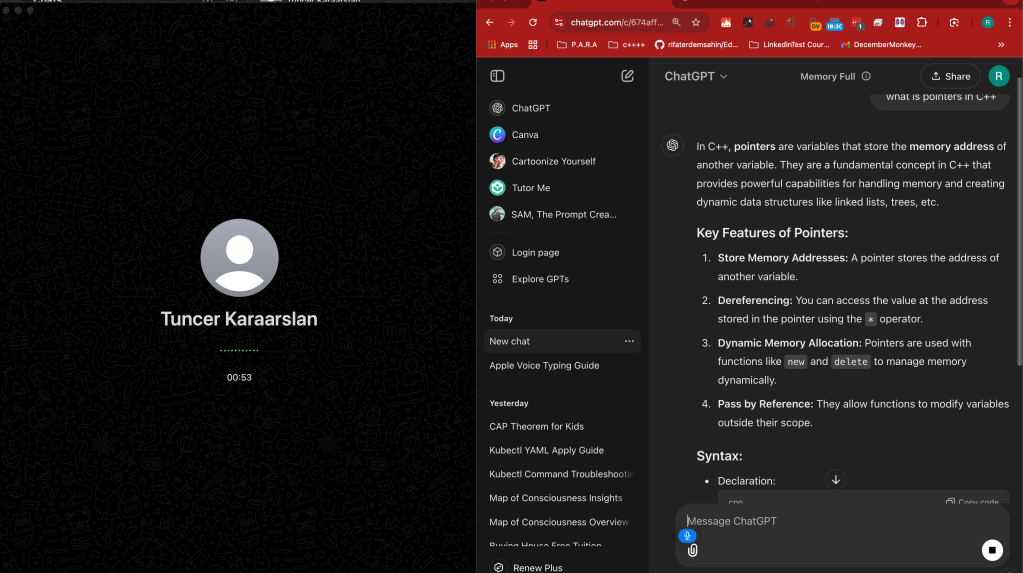
Here’s a quick look at my split-screen setup:
(Insert a screenshot showing an interview in progress on the left and ChatGPT responding to prompts on the right.)
🚀 Takeaways and Next Steps
This combination of dictation and ChatGPT has transformed how I approach live interviews and course prep. Whether you're a content creator, educator, or someone wearing multiple hats, this workflow can supercharge your productivity! 💪
What’s Next?
I’ll be fine-tuning this process while diving deeper into C++ course material. Stay tuned for updates on my journey! 🖥️✨
🔗 Connect with me:
Let’s keep the conversation going! Reach out through the platforms below:
-
💼 LinkedIn: https://www.linkedin.com/in/rifaterdemsahin/
-
🐦 Twitter: https://x.com/rifaterdemsahin
-
🎥 YouTube: https://www.youtube.com/@RifatErdemSahin
-
💻 GitHub: https://github.com/rifaterdemsahin
What do you think about this approach? Let me know in the comments below! ✍️
Imported from rifaterdemsahin.com · 2024