🚀 How I Automated My Recruiter Auto-Reply Process 💼
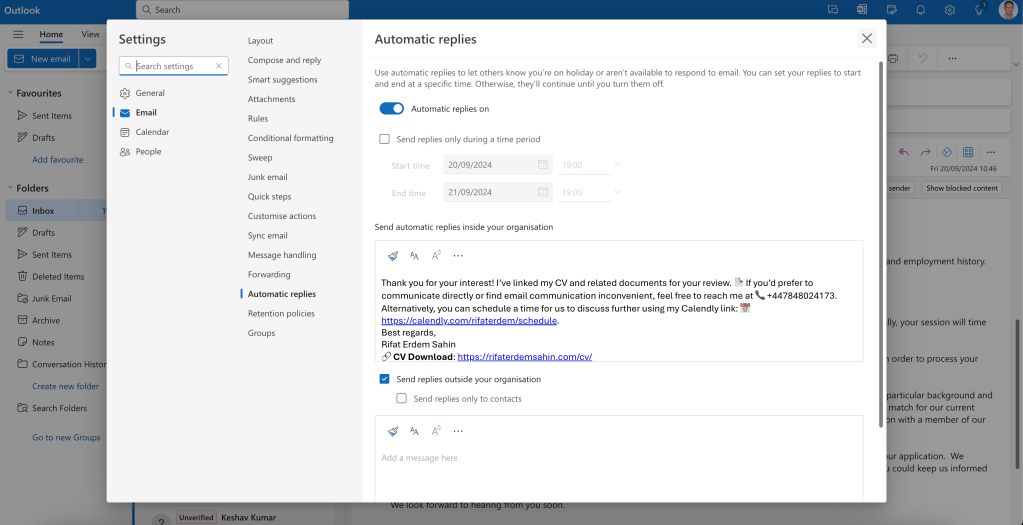
If you're like me, balancing multiple projects while handling numerous recruiter inquiries can become overwhelming. To streamline my communication, I implemented an auto-reply process specifically designed for recruiters. Here's how I did it!
📝 The Challenge
Recruiters often reach out with opportunities, and while it's essential to maintain a professional relationship, I can't respond to each message immediately. I wanted an automated solution that acknowledges their message while giving me time to evaluate opportunities.
💡 What I Wanted to Achieve
The goal was simple:
-
Acknowledgement: Auto-reply to recruiters instantly.
-
Professionalism: Keep the message polite, informative, and tailored.
-
Efficiency: Free up my time for more important tasks without missing out on potential opportunities.
🚀 How I Set It Up
1️⃣ Choosing the Right Tool
For this process, I used a combination of Zapier and Gmail. Zapier acts as the middleman, automatically sending out pre-written responses based on specific filters (e.g., recruiter emails).
2️⃣ Creating the Auto-Reply Template
I created a template that strikes the perfect balance between professionalism and courtesy:
Thank you for your interest! I’ve linked my CV and related documents for your review. 📄 If you’d prefer to communicate directly or find email communication inconvenient, feel free to reach me at 📞 +447848024173. Alternatively, you can schedule a time for us to discuss further using my Calendly link: 📅 https://calendly.com/rifaterdem/schedule.
Best regards,
Rifat Erdem Sahin
🔗 CV Download: https://rifaterdemsahin.com/cv/
CV Summary:
Erdem Sahin - CV Summary
📍 Location: London, United Kingdom
✉️ Email: [email protected]
📞 Phone: +44 7848 024173
🔗 LinkedIn: rifaterdemsahin
Professional Profile:
An experienced engineer with deep expertise in CI/CD, DevOps, and AI-based architectures, Erdem has a proven track record in optimizing and automating enterprise systems. He has a particular focus on automation, scalability, and security, with experience in both cloud and on-premise solutions.
Key Accomplishments:
🏆 2024: Developed an AI-driven CI/CD framework for Goldman Sachs (Muscat, Oman), increasing deployment frequency by 300% and reducing costs by 30%.
🏆 2023: Migrated IoT systems and optimized workflows at Ypsomed (Switzerland), resulting in a 40% reduction in versioning conflicts.
🏆 2022: Automated ETL processes for Cushman & Wakefield (London, UK), increasing data processing speed by 50%.
🏆 2021: Improved computational efficiency by 45% with Kubernetes and GPU-based containers for Emerson (USA).
🏆 2016: Increased technology utilization by 50% as an Enterprise Transformation Architect for Microsoft.
Competencies:
💼 Core Skills: DevOps, Transformation Specialist, SRE, Security Clearance, AI Consultant.
💻 Technical Expertise: CI/CD, AI Integration, Cloud Computing, Infrastructure as Code, Kubernetes, Docker, Data Engineering.
🛠 Familiar Tools: Azure, AWS, GCP, Terraform, Ansible, Jenkins, Python, and more.
Education:
🎓 Bachelor of Science – Southern New Hampshire University, USA (2013).
🎓 Diploma – Severna Park High School, USA (1999).
Certifications:
📜 Microsoft Certified Architect in Cloud Solutions (70-532).
Security Clearances:
🔒 UK SC (2028), NATO (2029), and others through IBM Watchdog and Sterling.
Availability:
Open for scheduling through Calendly 📅.
I hope this works for you! Let me know if you need any changes.
3️⃣ Setting Up the Trigger
Using Zapier, I created a trigger that scans my inbox for specific keywords like "job opportunity," "recruiter," and "opening." Once detected, it sends the auto-reply using my pre-designed template.
4️⃣ Testing & Tweaking
I ran multiple tests to ensure the system was seamless and tweaked the template based on feedback.
🚀 Bonus: You can further personalize the process by using CRM tools to track responses and add more details.
🔧 Tips for Creating Your Own Auto-Reply
-
Keep It Short: No one wants to read a long email.
-
Use Tools Wisely: Platforms like Zapier can integrate with multiple services.
-
Personalize When Possible: Adding the recruiter's name or a reference to their company shows that the response isn’t fully automated.
By automating this process, I’ve saved countless hours, maintained strong professional relationships, and gained more time to focus on other aspects of my career.
💡 Got any tips or questions about auto-replies? Let’s connect!
🔗 Connect with me:
-
💼 LinkedIn: https://www.linkedin.com/in/rifaterdemsahin/
-
🐦 Twitter: https://x.com/rifaterdemsahin
-
🎥 YouTube: https://www.youtube.com/@RifatErdemSahin
-
💻 GitHub: https://github.com/rifaterdemsahin
Now go out and automate! 🚀
Imported from rifaterdemsahin.com · 2024