🚀 Kubernetes & AI Integration: A Beginner’s Guide 🌐
Hey everyone! 👋 Ready to dive into the world of Kubernetes (K8s) with AI? In this post, I’ll break down some essential concepts to get you started with K8s and how it can support AI workloads seamlessly.
🛠️ Kubernetes 101: Building Blocks 🧩
In Kubernetes, we handle various components to ensure our applications are deployed smoothly and our data remains secure and accessible. Let’s go through some key concepts:
📦 Nodes, PV, and PVCs
-
Node: These are the basic units that run containerized applications in a cluster. Even if a node is deleted, don’t worry—your data is safe!
-
Persistent Volume (PV): Think of PV as durable storage that stays available even if a node or container is deleted. This is managed by the cluster controller, which handles storage behind the scenes, allowing us to focus on running applications.
-
Persistent Volume Claim (PVC): PVCs are requests for storage made by users. When an application needs storage, it requests a PVC, and Kubernetes allocates space on a PV for it. It’s like requesting a dedicated section of a hard drive.
📈 Performance with StorageClasses
With StorageClasses, we can optimize storage speeds for our specific workloads. You can request fast storage for applications that need quick data access by linking a PVC to a particular StorageClass.
💻 Implementing PVC with AI Workloads
Let’s look at a practical way to set up a PVC with Kubernetes for AI tasks that demand stable, durable storage:
-
Define Your PV: This allocates a section of storage in your cluster.
-
Create a PVC 📝: Request space by creating a PVC to use with your pods.
-
Assign to Your Node: Kubernetes will mount the storage when your pod is ready to run, automatically connecting to your PV.
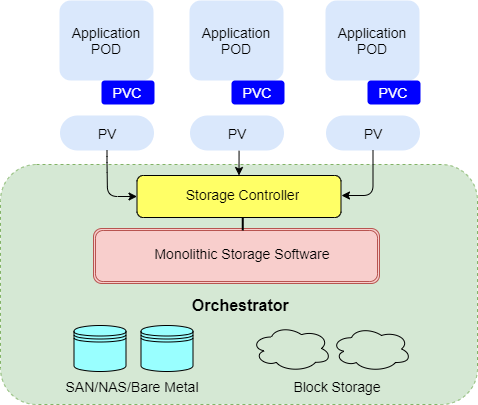
📊 Benefits of PVCs in AI
1. Data Security: Even if a node is deleted, data on PVs remains intact.
2. Automatic Remounting: PVCs allow seamless reconnections. If a pod needs to restart, it will reconnect to the same PV.
3. Scalable Storage for AI: You can request large storage for high-performance computing workloads using specific StorageClasses.
🛠️ Example: Configuring a PVC
Below is a basic YAML configuration for a PVC in Kubernetes.
apiVersion: v1
kind: PersistentVolumeClaim
metadata:
name: ai-pvc
spec:
accessModes:
- ReadWriteOnce
resources:
requests:
storage: 5Gi
storageClassName: fast-storage
Use kubectl apply -f yourfile.yaml to implement this in your cluster! 💻
Most popular CSI Plugins for Kubernetes include:
AWS Elastic Block Storage 💾
Azure disk 💿
BeeGFS 🐝
CephFS 🗄️
Dell EMC PowerMax 🔋
GCE Persistent Disk 💽
Google Cloud Filestore ☁️
GlusterFS 📦
Huawei Storage CSI 📱
HyperV CSI 💻
IBM Block Storage 🗃️
OpenEBS 📀
Portworx 🚢
Pure Storage CSI ⚡
🔗 Connect with me:
Hope this guide helps you kickstart your journey in K8s for AI workloads! Keep those screenshots handy and happy learning! 🚀
References
                https://blog.mayadata.io/understanding-persistent-volumes-and-pvcs-in-kubernetes
Imported from rifaterdemsahin.com · 2024