📝 Blog Post: How Deleting Videos Affects Your YouTube Channel 📉
If you’re considering cleaning up your YouTube channel by deleting videos, you might wonder how it will impact your channel’s overall performance. It’s a tricky decision that can have a variety of effects, both positive and negative, depending on your goals. In this post, we’ll dive into what you need to know before hitting that delete button! 🚀
💡 Why Delete Videos?
Content creators might choose to delete videos for several reasons:
-
Quality Concerns 🎥: Early videos may not reflect your current standards or brand.
-
Irrelevant Content 💼: If your niche has evolved, some videos might feel out of place.
-
Low Viewership 👀: Videos with low watch time or views can seem like dead weight on your channel.
🤔 How Deleting Videos Can Affect Your Channel
-
Impact on Watch Time & Views 📉
-
Watch time is one of YouTube’s key metrics for recommending content. Deleting high-viewed videos will reduce your channel’s overall watch time, which might affect YouTube’s algorithmic support for your channel.
-
Pro Tip: Before deleting, assess if the video is still contributing a significant amount of watch time to your channel.
-
Subscriber Impact 📲
-
Deleting videos that brought in subscribers can also affect your channel's subscriber count. Subscribers who joined based on specific content may lose interest if that content is removed.
-
Consider unlisting videos rather than deleting them outright to keep them accessible to existing subscribers without showing them to the general audience.
-
Algorithmic Considerations 🧠
-
YouTube’s algorithm values consistency. Removing videos disrupts historical performance metrics and may impact how the algorithm evaluates your content.
-
Note: Algorithms favor content that steadily performs well over time. Think twice before removing any well-performing video, even if it's old or "off-brand."
-
Channel Authority 📊
-
Videos with high engagement contribute to your “channel authority,” signaling to YouTube that your channel offers valuable content. Deleting these videos may result in decreased authority, making it harder for your new videos to get initial traction.
✅ Alternative Approaches Instead of Deleting
-
Unlist Videos 🔒
-
Unlisting keeps the video accessible to those with the link but hides it from public view and search, preserving its watch time and engagement metrics.
-
Create Playlists 📚
-
Place older, off-brand content into specific playlists, so it doesn’t clutter your main feed but remains accessible for curious viewers.
-
Refresh and Update Content 🔄
-
Rather than deleting, consider reworking older videos. A quick refresh can breathe new life into older content without risking watch-time losses.
🛠️ Step-by-Step Screenshot Pauses
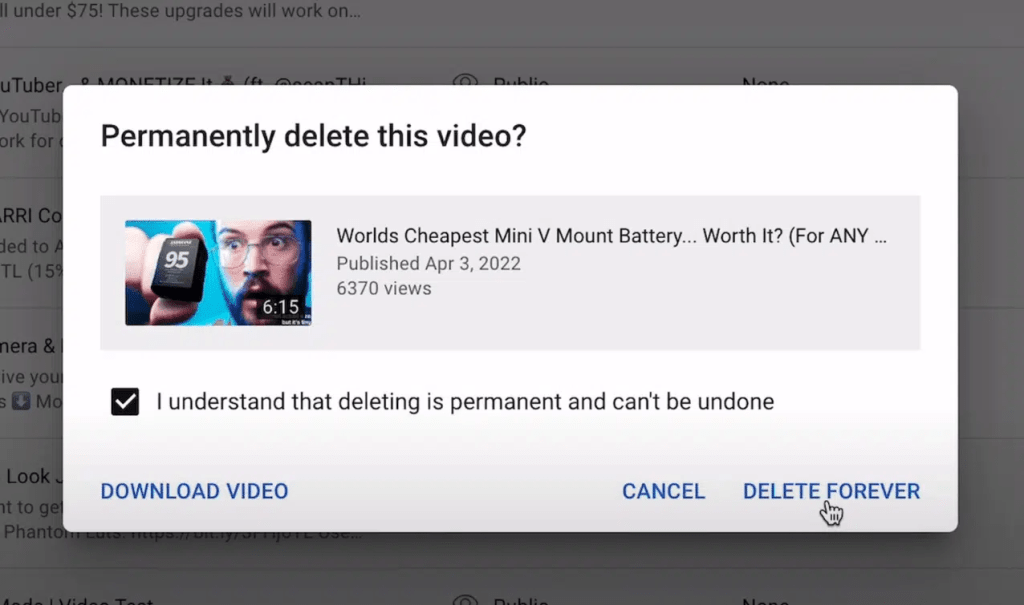
🔍 Go to Content in YouTube Studio → select the video(s) → Click on Options → Choose Delete Forever or Unlist as needed.
🔗 Connect with me:
If you want more tips or a deeper look into YouTube strategies, let's connect! I’m always happy to share insights on how to optimize your content for better reach and engagement. 💪
-
💼 LinkedIn: https://www.linkedin.com/in/rifaterdemsahin/
-
🐦 Twitter: https://x.com/rifaterdemsahin
-
🎥 YouTube: https://www.youtube.com/@RifatErdemSahin
-
💻 GitHub: https://github.com/rifaterdemsahin
Imported from rifaterdemsahin.com · 2024