How to Use Text Blaze and AI to Generate Custom Images Effortlessly
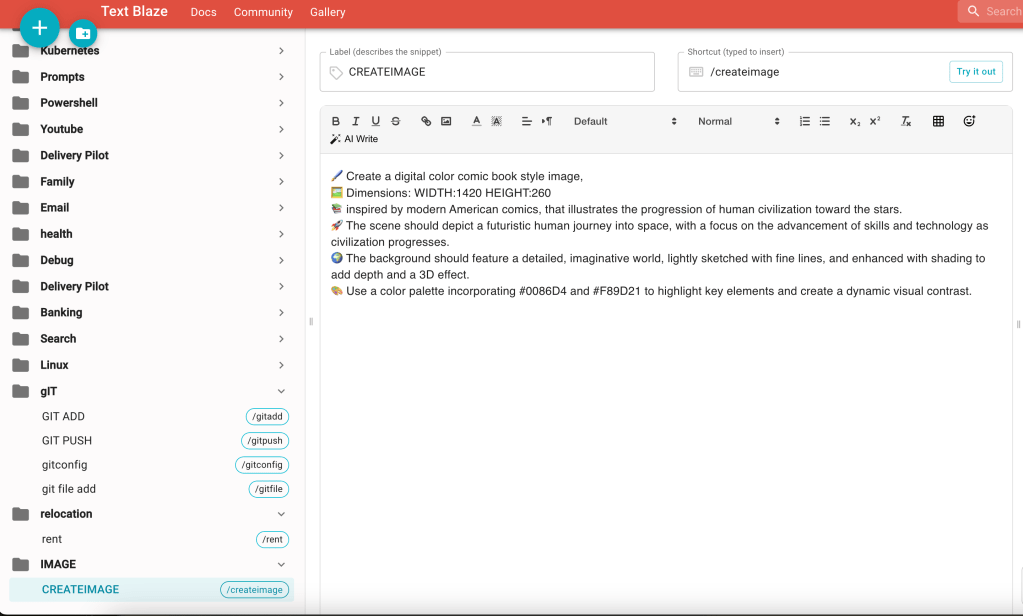
In today’s digital world, creating visually appealing content is more important than ever. Whether you’re a blogger, social media marketer, or business owner, having access to unique and customized images can set you apart from the competition. But what if you could automate the process of generating these images with a simple text command? That’s where the power of Text Blaze and AI-driven image generation comes into play.
What is Text Blaze?
Text Blaze is a powerful text expansion tool that allows you to create snippets of text that can be triggered by simple shortcuts. It’s a fantastic tool for anyone who frequently types repetitive content, whether it's for emails, reports, or social media posts. Text Blaze saves time and boosts productivity by allowing you to insert pre-defined text blocks with just a few keystrokes.
Introducing AI-Powered Image Generation
With the advancements in AI, particularly in natural language processing and image generation, it’s now possible to create detailed images based on text prompts. AI tools like DALL-E can generate images from simple descriptions, allowing you to produce unique visuals without the need for graphic design skills.
How to Integrate Text Blaze with AI Image Generation
Combining Text Blaze with AI image generation tools, like DALL-E, allows you to automate the creation of images based on text prompts you’ve saved in Text Blaze snippets. Here’s how you can set it up:
-
Create a Text Blaze Snippet: First, you'll want to create a Text Blaze snippet that includes your image prompt. For example, if you frequently need images of “a cozy reading nook with books and a fireplace,” you can save this prompt as a snippet.Example:bashCopy code
/readingnookWhen triggered, this snippet will expand into:cssCopy codeGenerate an image of a cozy reading nook with shelves full of books, a comfortable armchair, and a fireplace. -
Use Text Blaze with AI Image Tools: Once your snippet is ready, you can use it with an AI image generation tool like DALL-E. Depending on the platform, you might paste the expanded text directly into the AI tool’s prompt box. The AI will then generate an image based on your saved prompt.
-
Save and Reuse: You can save and reuse these prompts as often as needed. If you frequently create content around specific themes, having these snippets can save you a lot of time.
Step-by-Step Example
Let’s say you’re a lifestyle blogger who often writes about home decor. You need images that match the aesthetic of your blog. With Text Blaze, you could create a few key snippets for different scenes:
-
/cozyroom:
Prompt: "Generate an image of a cozy living room with a large window, soft lighting, and a mix of modern and vintage furniture." -
/minimalbedroom:
Prompt: "Create an image of a minimalist bedroom with white walls, a wooden bed frame, and natural light streaming in." -
/kitchenstyle:
Prompt: "Design an image of a stylish kitchen with marble countertops, stainless steel appliances, and open shelving."
Whenever you need a new image for your blog post, simply trigger the appropriate snippet, paste it into your AI image generator, and voila! A custom image ready to be used.
Why This Method Works
Using Text Blaze to generate prompts for AI image tools is an efficient way to maintain a consistent style in your visual content. It also ensures that you don’t have to recreate the wheel every time you need a new image. By saving your most-used prompts, you streamline your content creation process and ensure that your visuals always align with your brand’s aesthetics.
Final Thoughts
As AI technology continues to evolve, tools like Text Blaze and DALL-E offer exciting possibilities for content creators. By integrating these tools, you can automate much of the creative process, freeing up time to focus on other aspects of your work. Whether you’re a blogger, a marketer, or a business owner, this approach can help you produce high-quality content more efficiently.
Start experimenting with Text Blaze and AI-powered image generation today, and see how it can transform your content creation process!
Connect with me:
-
LinkedIn: https://www.linkedin.com/in/rifaterdemsahin/
-
Twitter: https://x.com/rifaterdemsahin
-
YouTube: https://www.youtube.com/@RifatErdemSahin
Imported from rifaterdemsahin.com · 2024