🎥 My Video Production Process: A Behind-the-Scenes Look! 🎬
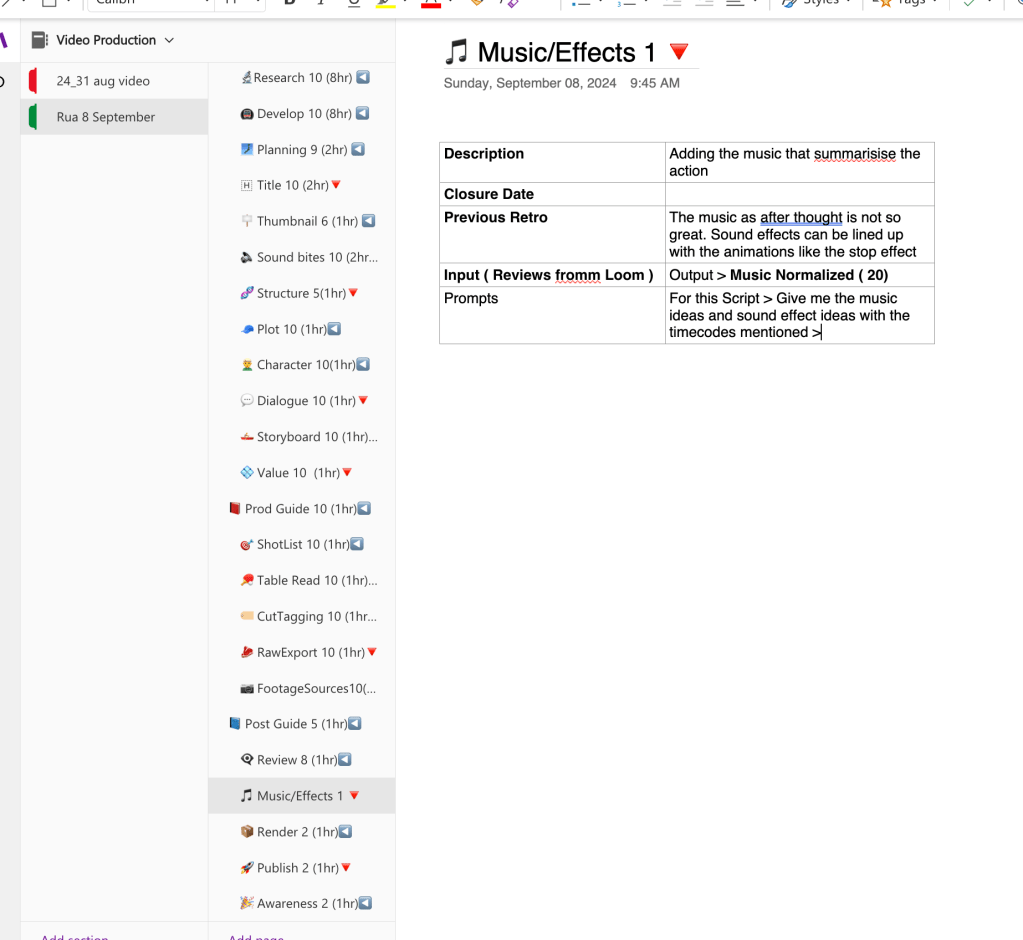
I am using oneNote pages in a dynamic manner and iterate on them.
Creating videos isn’t just about capturing footage—there’s so much more that goes into making a video shine! ✨ From developing the concept to adding the final touches like music and effects, here’s a breakdown of how I produce my videos, including some tips and tricks I’ve picked up along the way!
1. Research and Development 🔍💡
Everything starts with an idea. I spend a good chunk of time brainstorming and researching for inspiration. This part of the process is where creativity flows, but it’s also where I consider what's trending, what my audience likes, and how I can stand out. 💡
2. Planning & Structure 📋✍️
Once the concept is locked in, it’s time to plan. A solid structure helps everything flow smoothly later on. I outline my videos, breaking them down into key parts:
-
Plot 🧩: This is the core of the video.
-
Character 🎭: Who or what will the audience be following?
-
Dialogue 💬: Any speaking or voiceovers are mapped out.
3. Storyboarding 🎨🖊️
With the structure set, I move on to the visual blueprint: the storyboard. This helps visualize the scenes before I even start filming. 📽️ It also gives me a clear direction for each shot, saving time and headaches later.
4. Filming/Production 🎥✨
This is where the magic happens! I make sure to follow the shot list closely, which keeps me organized and ensures I get all the footage I need. Keeping track of all the footage sources 📂 helps immensely when it’s time to edit.
5. Editing & Cut Tagging ✂️⚙️
Here’s where I trim the fat and let the best moments shine. I spend a good amount of time tagging footage and aligning scenes with the storyboard to create a seamless flow. Knowing exactly where to cut makes editing a breeze, and the finished product is much more engaging for viewers.
6. Adding Music and Sound Effects 🎶🔊
Here’s where it all comes together! I believe music can make or break a scene. 🎶 Adding music that summarizes the action makes it more impactful, while sound effects (like stop effects) add that extra punch. In my recent project, I made sure to align the sound effects with specific animations, making everything feel more connected.
Final Touches 🎯📌
After the big tasks are done, I like to go back and add final tweaks: adjusting colors, normalizing the sound, and making sure everything is polished. After reviewing the video and getting input from others, I’ll finalize and publish!
🔥 Pro Tips!
-
Stay Organized 🗂️: With so many elements, having a detailed structure and shot list saves tons of time later.
-
Don’t Underestimate Music 🎶: Sound really brings the visuals to life. Spend time finding the perfect tracks and effects!
-
Continuous Improvement 🔄: Always review and tweak. Ask for feedback and adjust based on the suggestions. Even small changes can make a huge difference.
I hope this gives you some insight into my video production process! 🎬 Whether you're a fellow content creator or someone interested in how videos come together, this is a peek into the work behind the scenes. 🚀
Stay tuned for more behind-the-scenes looks! ✌️
Feel free to tweak or expand it as you see fit!
🔗 Connect with me:
-
💼 LinkedIn: https://www.linkedin.com/in/rifaterdemsahin/
-
🐦 Twitter: https://x.com/rifaterdemsahin
-
🎥 YouTube: https://www.youtube.com/@RifatErdemSahin
-
💻 GitHub: https://github.com/rifaterdemsahin
Imported from rifaterdemsahin.com · 2024