HAProxy Enterprise: A Comprehensive Guide to Real-time Dashboard
Introduction
HAProxy Enterprise is a high-performance, robust, and feature-rich version of the popular open-source HAProxy load balancer. This blog post covers the key aspects of HAProxy Enterprise, focusing on the Real-time Dashboard, a powerful tool for monitoring and managing your HAProxy Enterprise instances.
Changelog and Release Notes
Stay updated with the latest enhancements and fixes by regularly checking the changelog and release notes. Understanding these updates helps in leveraging new features and maintaining a secure and efficient load-balancing environment.
End-of-life Dates
Knowing the end-of-life dates for different versions of HAProxy Enterprise is crucial for planning upgrades and ensuring continued support and security for your deployments.
Configuration Tutorials
Configuration tutorials provide step-by-step guides to setting up and optimizing HAProxy Enterprise. Whether you're configuring a new installation or tweaking an existing setup, these tutorials are invaluable.
Key Features of HAProxy Enterprise
Bot Management
Effectively manage and mitigate bot traffic with HAProxy Enterprise’s bot management capabilities. This feature helps in identifying and controlling malicious bots to protect your web applications.
Web Application Firewall (WAF)
Enhance your security posture with the Web Application Firewall, which provides comprehensive protection against common web vulnerabilities.
Dynamic Updates
HAProxy Enterprise supports dynamic updates, allowing you to change configurations without restarting the service, ensuring zero downtime and continuous service availability.
Global Profiling Engine
The Global Profiling Engine aggregates traffic data from multiple nodes, providing a holistic view of your network's performance and enabling better decision-making.
Global Server Load Balancing (GSLB)
GSLB distributes traffic across multiple geographic locations, improving redundancy and optimizing performance by directing users to the closest or least loaded server.
Real-time Dashboard
Deprecation Notice
The Real-time Dashboard has been marked as deprecated and will be removed after version 2.8. While still available, it is recommended to explore alternative monitoring solutions.
Overview
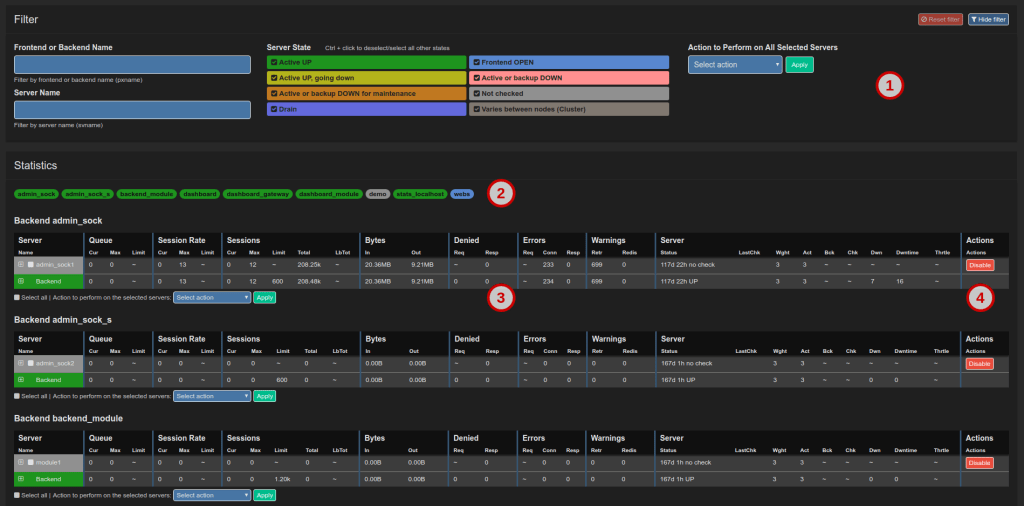
The Real-time Dashboard is a web application that collects and displays live metrics from HAProxy Enterprise load balancers. You can perform actions like disabling servers directly from the dashboard.
Installation
To install the Real-time Dashboard, use your system’s package manager:
sudo apt-get install hapee-2.8r1-lb-dashboard
This command installs the dashboard components and sets up the necessary configuration files.
Configuration
Configure the dashboard by editing the dashboard-module.cfg file to expose metrics data on port 9022. Restart the HAProxy Enterprise service for the changes to take effect:
sudo systemctl restart hapee-2.8-lb
Using the Dashboard
Open the dashboard in your browser and configure it to fetch metrics data from HAProxy Enterprise. You can choose between Single Node or Cluster Aggregation mode.
Single Node Configuration
Set the Data Source to Real-time Dashboard Module and the Data Source Mode to Single Node. The default port is 9022.
Cluster Aggregation Configuration
For multiple nodes, set the Data Source Mode to Cluster Aggregation and list the nodes in the dashboard-config.lua file.
Enhancing Security
Enable HTTPS to secure communication between the dashboard and HAProxy Enterprise. Obtain a valid TLS certificate and update the configuration to use SSL.
Advanced Features
Stick Table Explorer
The Stick Table Explorer allows you to retrieve, filter, and export the contents of stick tables from HAProxy Enterprise nodes, providing insights into session data.
HTTP Basic Authentication
Secure the Real-time Dashboard with HTTP Basic Authentication by configuring users and passwords in the dashboard-module.cfg and config.json files.
Conclusion
HAProxy Enterprise's Real-time Dashboard offers a powerful interface for monitoring and managing your load balancers. Despite its upcoming deprecation, it remains a valuable tool for real-time insights and operational control. Stay tuned to HAProxy’s updates and explore alternative monitoring solutions to ensure continuous, optimal performance of your infrastructure.
Imported from rifaterdemsahin.com · 2024