How to Integrate GPT with WordPress for Dynamic, Live-Updated Content
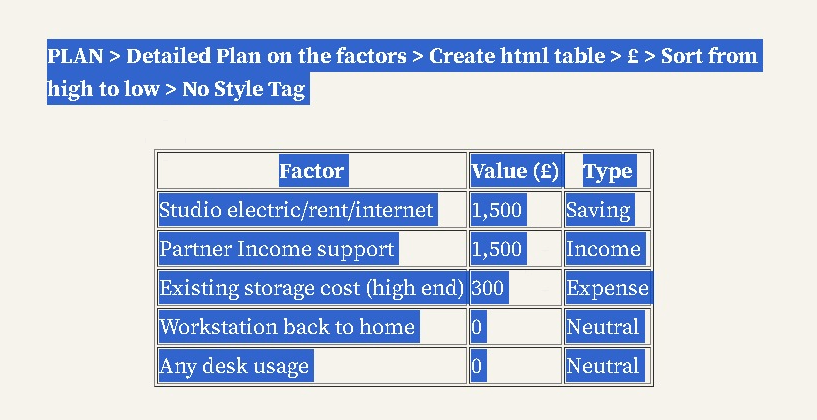
Initial
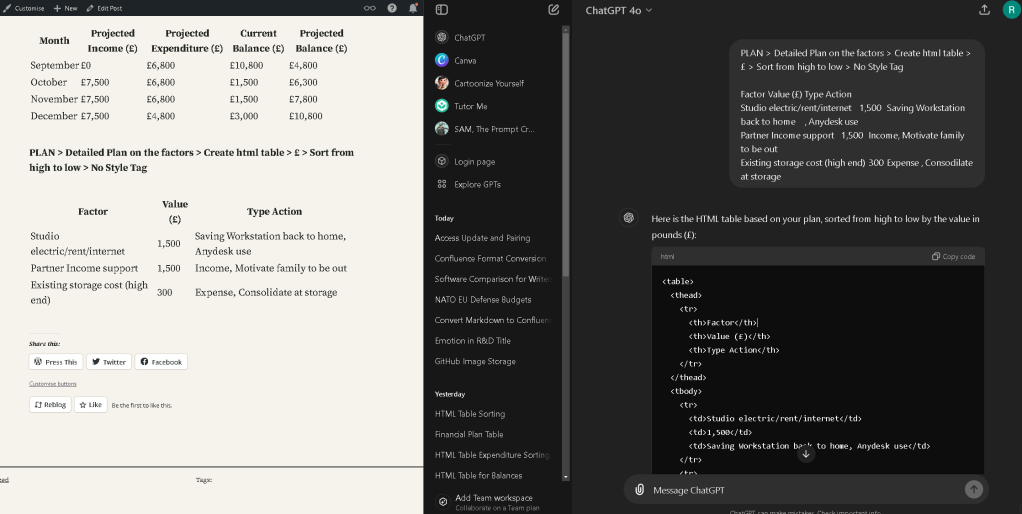
Update Process
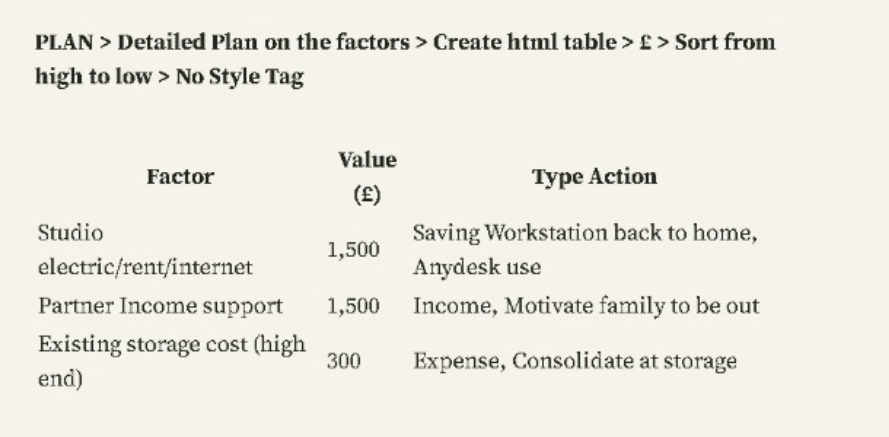
Output
How to Integrate ChatGPT with WordPress Without an API: Embedding Prompts into Your Pages for Iterative Writing
Integrating ChatGPT into your WordPress site can revolutionize how you create content, especially if you're keen on leveraging AI to draft, revise, and enhance your articles. While most tutorials focus on using APIs to connect ChatGPT with WordPress, there's a simpler, more direct method that doesn’t require technical knowledge or programming skills: embedding prompts directly into your pages for iterative writing. This method allows you to use ChatGPT as a real-time brainstorming and editing tool within your WordPress dashboard, creating a seamless content creation experience.
Why Integrate ChatGPT with WordPress?
Before diving into the how-to, let's briefly discuss why you might want to integrate ChatGPT with your WordPress site. ChatGPT can help:
-
Enhance Creativity: By providing fresh ideas and perspectives on topics you might be too close to.
-
Improve Writing Efficiency: Generate drafts or suggest revisions, allowing you to focus on fine-tuning rather than initial creation.
-
Maintain Consistency: Ensure your tone and style remain consistent across multiple articles or pages.
-
Support Brainstorming: Offer topic suggestions or content outlines, especially helpful during brainstorming sessions.
How to Integrate ChatGPT with WordPress Without an API
The following steps will guide you through integrating ChatGPT with WordPress by embedding prompts directly into your pages. This approach doesn't require an API, making it accessible and straightforward.
Step 1: Use Multitasking Screens for Seamless Workflow
To make the most of this method, use a dual-screen setup. On one screen, keep your WordPress editor open; on the other, have the ChatGPT interface ready. This setup allows you to quickly switch between drafting your content in WordPress and generating or refining prompts in ChatGPT.
Step 2: Craft Your Prompts for ChatGPT
The first step in this process is to create specific prompts tailored to your content needs. For instance:
-
For Generating Ideas: "ChatGPT, suggest five unique blog post ideas about integrating AI in content marketing."
-
For Drafting Content: "ChatGPT, write an introduction for a blog post about the benefits of using AI in content creation."
-
For Refining Content: "ChatGPT, rewrite this paragraph to make it more engaging: [Insert your text here]."
Create a document or a draft in your WordPress editor where you list these prompts. This way, you can quickly copy and paste them into ChatGPT and get the content you need.
Step 3: Embed Prompts into Your WordPress Page
Once you have your prompts, you can embed them directly into your WordPress page or post. Here’s how:
-
Create a Draft Page or Post: Start by creating a new draft in WordPress. You can use this page as a working document where you’ll integrate ChatGPT’s responses into your content.
-
Insert Prompts as HTML Comments: To avoid displaying the prompts to your readers, insert them as HTML comments in the WordPress editor. This way, they are invisible on the front end but can be referenced whenever you need them.
-
Iteratively Write and Revise: Use ChatGPT to generate content based on the embedded prompts. Copy the output from ChatGPT, paste it into your WordPress editor, and then use your judgment to refine or expand on the AI-generated text.
-
Update Prompts as Needed: As you develop your content, you may find that you need additional or revised prompts. Simply add these to your HTML comments and repeat the process.
Step 4: Edit and Refine Your Content
With your ChatGPT-generated content in WordPress, you can now focus on editing and refining. Use your expertise to enhance the AI’s output, ensuring it matches your tone, style, and the specific needs of your audience.
Step 5: Finalize and Publish
Once you're satisfied with the content, remove any HTML comments with prompts from your draft and prepare your post or page for publishing. Double-check for any needed tweaks or SEO optimizations before hitting that "Publish" button.
Tips for Effective Integration
-
Use Specific Prompts: The more specific your prompts, the better the output from ChatGPT. Be clear about what you want to achieve with each prompt.
-
Iterate Frequently: Don’t settle for the first output you get. Use ChatGPT iteratively to refine and improve content.
-
Maintain a Human Touch: While ChatGPT is a powerful tool, ensure that your content retains a personal touch and aligns with your brand voice.
-
Keep Prompts Organized: Maintain a document or a dedicated page where you can store and update your prompts, making them easy to access and use.
Conclusion
Integrating ChatGPT with WordPress without an API is a straightforward yet effective way to enhance your content creation process. By embedding prompts into your pages and utilizing a dual-screen setup, you can seamlessly write, revise, and refine your content with the help of AI. This method not only saves time but also helps maintain a high standard of quality and creativity in your writing. Happy writing!
Imported from rifaterdemsahin.com · 2024