Enhancing Productivity with PowerToys: A Deep Dive into the Advanced Paste Feature
In the ever-evolving landscape of digital tools, productivity remains a key focus for both individuals and organizations. Microsoft PowerToys, a suite of utilities for power users to tune and streamline their Windows experience, has consistently offered robust features that enhance productivity. One such feature is "Advanced Paste," a game-changer for anyone who frequently handles text.
What is PowerToys?
For the uninitiated, Microsoft PowerToys is a set of freeware system utilities designed for Windows power users. Originally introduced with Windows 95 and later revived for Windows 10, PowerToys includes various tools that allow users to customize and optimize their Windows workflow. From FancyZones, a window manager, to PowerRename, a batch renaming tool, PowerToys has something for everyone looking to make their computer usage more efficient.
Introducing Advanced Paste
Among the myriad of features PowerToys offers, Advanced Paste stands out as a highly innovative tool that addresses a common pain point: managing clipboard content. Let's delve into what Advanced Paste is and how it can transform the way you work with text.
The Clipboard Conundrum
The traditional clipboard functionality allows users to copy and paste text, but it comes with limitations. You can only paste the most recently copied item, and formatting can often be a hassle. This is where Advanced Paste comes into play, offering an enhanced clipboard experience that goes beyond the basics.
Key Features of Advanced Paste
-
Clipboard History: Advanced Paste provides access to a history of copied items. This means you can go back and paste items you copied earlier without having to recopy them. It's a real time-saver when working on large projects or multiple documents.
-
Formatting Options: With Advanced Paste, you can choose to paste text with or without formatting. This flexibility is particularly useful when you need to insert text into different types of documents, ensuring consistency and avoiding formatting issues.
-
Text Transformations: Advanced Paste includes options to automatically transform text. Whether you need to change case, remove line breaks, or replace certain characters, these transformations can be done on the fly, reducing the need for additional editing tools.
-
Custom Snippets: You can save frequently used text snippets and paste them quickly whenever needed. This feature is ideal for standard responses, code snippets, or any text you use repeatedly.
How to Use Advanced Paste
Using Advanced Paste is straightforward and intuitive, much like the rest of the PowerToys suite. Here’s a quick guide to get you started:
-
Installation: First, ensure you have PowerToys installed on your system. You can download it from the official GitHub repository or the Microsoft Store.
-
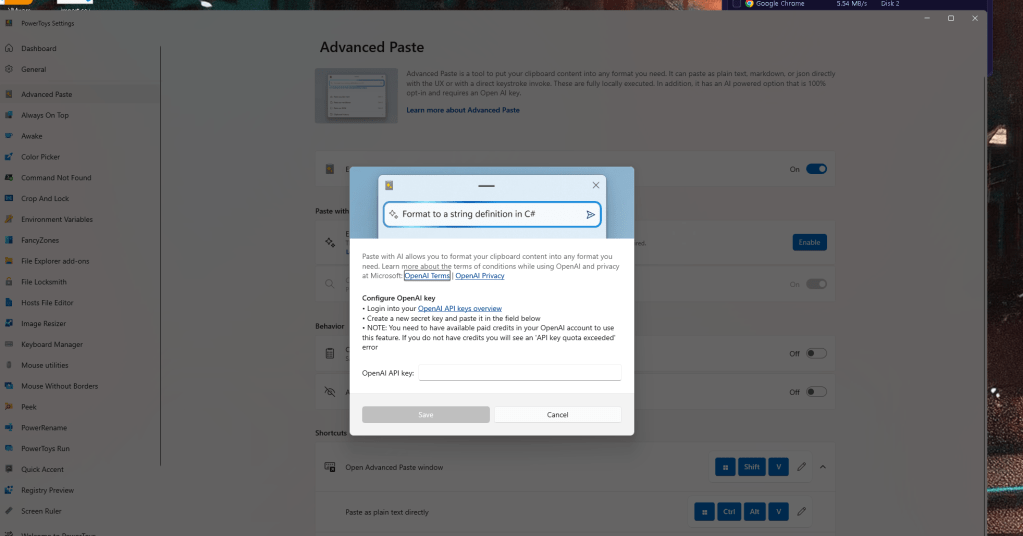
Accessing Advanced Paste: Once installed, open the PowerToys settings and navigate to the Advanced Paste section. Here, you can enable the feature and customize settings according to your preference.
-
Using Clipboard History: Press
Win + Vto open the clipboard history. From here, you can select any previously copied item to paste. -
Formatting and Transformations: When pasting, a menu will appear allowing you to choose formatting options or apply transformations. This ensures you get the text exactly how you need it.
-
Managing Snippets: In the Advanced Paste settings, you can add and manage your custom snippets. These snippets can be quickly accessed and pasted using a designated shortcut.
Real-World Applications
The versatility of Advanced Paste makes it suitable for various tasks across different fields. Here are a few examples:
-
Programming: Developers can save and reuse code snippets, making coding more efficient and reducing the risk of errors.
-
Content Creation: Writers and editors can manage quotes, references, and frequently used phrases, streamlining the writing process.
-
Customer Support: Support agents can use canned responses and troubleshoot steps, ensuring quick and consistent communication.
Conclusion
Advanced Paste is a testament to how a seemingly small feature can significantly impact productivity. By enhancing the clipboard functionality, PowerToys enables users to work smarter, not harder. Whether you’re a developer, writer, or customer support agent, Advanced Paste has the potential to streamline your workflow and make your tasks more manageable.
If you haven’t explored PowerToys yet, now is the perfect time to start. Dive into the world of advanced productivity tools and discover how features like Advanced Paste can revolutionize the way you work.
Are you already using PowerToys and the Advanced Paste feature? Share your experiences and tips in the comments below!
Imported from rifaterdemsahin.com · 2024