Streamlining DevOps with Red Hat Enterprise Linux (RHEL)
The DevOps cycle is crucial for ensuring that software development and IT operations work hand-in-hand to deliver high-quality software efficiently and effectively. Red Hat Enterprise Linux (RHEL) provides robust tools and integrations that facilitate this process. In this blog post, we'll explore how RHEL, specifically through its Hybrid Cloud Console, can streamline the DevOps lifecycle.
Understanding the RHEL Hybrid Cloud Console
The RHEL Hybrid Cloud Console is a unified platform that provides tools and insights for managing RHEL systems across different environments. One of the powerful features of this console is its ability to create, manage, and deploy system images, which are essential for maintaining consistent environments across development, testing, and production stages.
Key Features of the RHEL Hybrid Cloud Console
-
Blueprints: Blueprints allow you to define and customize the configuration of your RHEL images. These configurations ensure that every deployment is consistent with your organization's requirements.
-
Image Creation: The console facilitates the creation of images that can be deployed on bare metal, virtual machines, and cloud instances. This flexibility is crucial for hybrid and multi-cloud environments.
-
Version Control: Managing different versions of images ensures that you can track changes, roll back to previous versions if necessary, and maintain a stable environment.
-
Status Monitoring: The console provides real-time updates on the status of image builds, allowing you to monitor progress and troubleshoot issues promptly.
Building and Managing Images
Let's take a look at a practical example of using the RHEL Hybrid Cloud Console to build and manage system images.
Step-by-Step Process
-
Create a Blueprint:
-
Navigate to the "Blueprints" section and create a new blueprint.
-
Customize the blueprint with the necessary packages, configurations, and scripts that meet your application requirements.
-
Build an Image:
-
Select the created blueprint and initiate the build process.
-
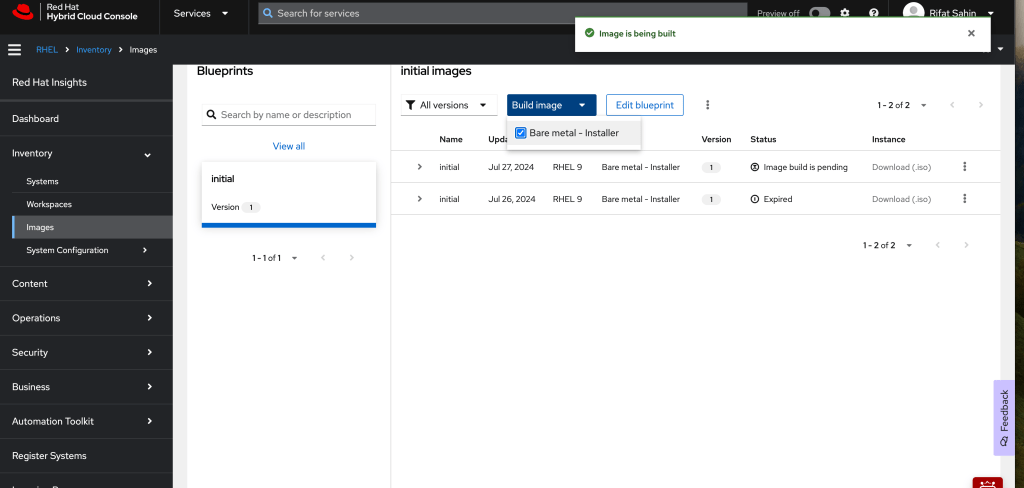
Choose the target environment for the image, such as "Bare metal - Installer."
-
The console will handle the build process, providing updates on the status.
-
Monitor Image Status:
-
Once the build is initiated, you can monitor the status in the "Images" section.
-
The console will indicate whether the image build is pending, in progress, or completed.
-
You can also see the version history and download the image in various formats (e.g., .iso for bare metal installations).
-
Deploy and Manage:
-
After the image is built, you can deploy it across your development, testing, and production environments.
-
Use the console to manage these deployments, ensuring that each environment is consistent and up-to-date.
Practical Example
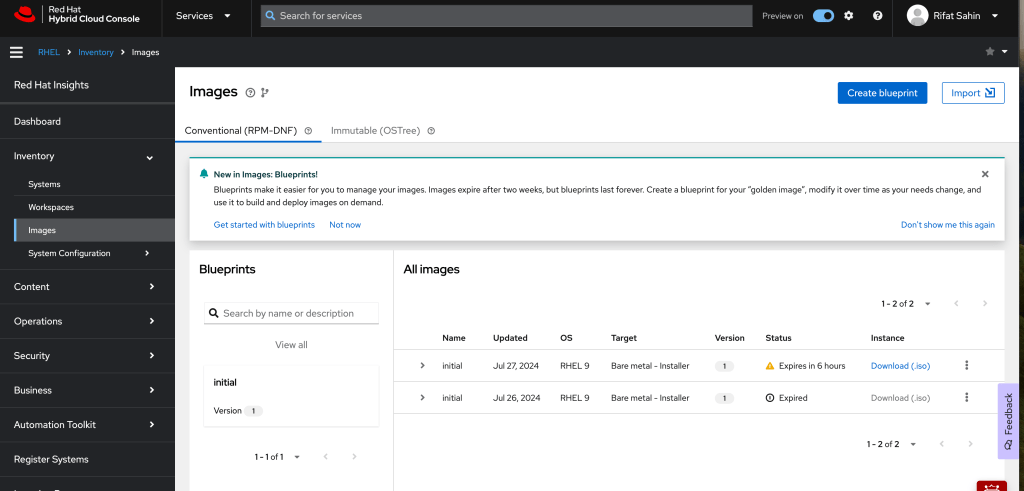
In the image provided, we see an example of the RHEL Hybrid Cloud Console in action. The user has created an "initial" blueprint and built two versions of the image. The image build for the latest version is currently pending, while the previous version is marked as expired. This setup allows the user to maintain control over their environments, ensuring that they can easily roll out updates or revert to a previous stable state if necessary.
Benefits of Using RHEL for DevOps
-
Consistency: Ensures that all environments are identical, reducing the "it works on my machine" problem.
-
Efficiency: Speeds up the deployment process with automated image builds and deployments.
-
Scalability: Supports deployments across various platforms, including bare metal, virtual machines, and cloud environments.
-
Control: Provides tools for monitoring and managing the entire lifecycle of your system images.
Conclusion
Integrating RHEL into your DevOps cycle can significantly enhance the efficiency and reliability of your software development and IT operations. The RHEL Hybrid Cloud Console, with its powerful features for building and managing system images, plays a crucial role in maintaining consistent and stable environments. By leveraging these tools, organizations can streamline their DevOps processes, leading to faster delivery times, improved stability, and greater overall productivity.
Explore the RHEL Hybrid Cloud Console today and see how it can transform your DevOps workflow.
Note: This blog post is based on an example provided in an image. For a detailed guide and further insights, consider exploring the official Red Hat documentation and resources.
LOL 6 HOUR TIME >
Imported from rifaterdemsahin.com · 2024