Crafting Dynamic Blog Posts with Composite Slides and Video Reverse Engineering using Canva Video Presentations
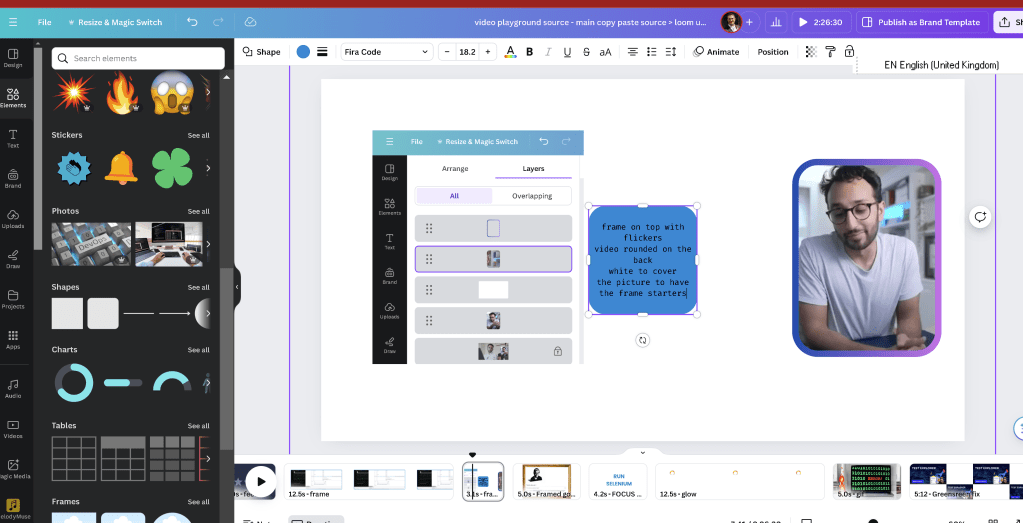
Crafting Dynamic Blog Posts with Composite Slides and Video Reverse Engineering using Canva Video Presentations
Introduction
Welcome to this blog post where we delve into the innovative use of composite slides and video reverse engineering for creating dynamic content using Canva Video Presentations. This approach allows for a flexible and customizable system that can adapt to various types of content, making your blog more interactive and engaging.
What Are Composite Slides?
Composite slides are a powerful tool that combines multiple elements such as text, images, and videos into a single, cohesive slide. This allows for a richer and more engaging presentation of content. Using composite slides, you can seamlessly integrate various media types to create a more interactive experience for your readers.
The Design Concept
I designed this concept using Canva Video Presentations, a versatile design tool that enables the creation of visually appealing slides. The design includes:
-
Text Blocks: For clear and concise information.
-
Image Overlays: To provide visual context and appeal.
-
Embedded Videos: To enhance understanding through multimedia.
-
Active Motion Elements: Such as flickering frames
Implementing Composite Slides
To implement composite slides on your blog, follow these steps:
-
Design Your Slides in Canva: Start by creating your slides in Canva. Use the various tools available to design engaging and informative slides. Ensure each slide contains a mix of text, images, and videos for maximum impact.
-
Export Your Designs: Once your slides are ready, export them as images or PDFs. Canva allows you to download your designs in multiple formats, making it easy to integrate them into your blog.
-
Integrate with Your Blog Platform: Use the exported designs and embed them into your blog posts. If your blog platform supports it, use HTML or a page builder plugin to create sections that can display these slides effectively.
Reverse Engineering Videos
Reverse engineering videos involve deconstructing existing videos to understand their structure, design, and content flow. This process can help you create similar content or improve your current videos.
Steps to Reverse Engineer Videos
-
Choose a Video to Analyze: Select a video that you find impressive or want to replicate. It could be from a competitor, an influencer, or any source that aligns with your content goals.
-
Break Down the Content: Watch the video multiple times and take notes on its key components. Pay attention to the following:
-
Script and Narration: How is the story told? What is the tone and style of the narration?
-
Visual Elements: What types of visuals are used? How are transitions and effects applied?
-
Audio and Music: What background music or sound effects are included?
-
Engagement Techniques: How does the video keep the viewer engaged? Are there call-to-actions or interactive elements?
-
Replicate and Customize: Use the insights gathered to create your own video. Customize the content to fit your brand and message while incorporating the successful elements identified during the analysis.
Creating a Changeable System
A changeable system allows you to easily update and modify your blog content without having to start from scratch. Here's how you can create such a system:
-
Modular Design: Use a modular approach where each component (text, images, videos) is a separate module that can be easily replaced or updated.
-
Template-Based Approach: Create templates for your blog posts that can be reused and customized. This saves time and ensures consistency across your posts.
-
Content Management System (CMS): Utilize a CMS that supports easy content updates. Platforms like WordPress, Joomla, or Drupal offer flexibility and tools to manage your content efficiently.
-
Interactive Elements: Incorporate interactive elements such as quizzes, polls, and forms that can be easily updated to keep the content fresh and engaging.
Conclusion
By implementing composite slides and utilizing video reverse engineering through Canva Video Presentations, you can create dynamic and engaging blog content. This approach not only enhances the visual appeal of your posts but also provides a more interactive experience for your readers. Moreover, a changeable system ensures that your content remains up-to-date and relevant, allowing you to adapt quickly to new trends and information.
Feel free to reach out if you have any questions or need further assistance with creating composite slides and reverse engineering videos for your blog. Happy blogging!
https://www.canva.com/folder/FAFDTpZVlDo/sequence/DAGH_tbK-AE
Imported from rifaterdemsahin.com · 2024