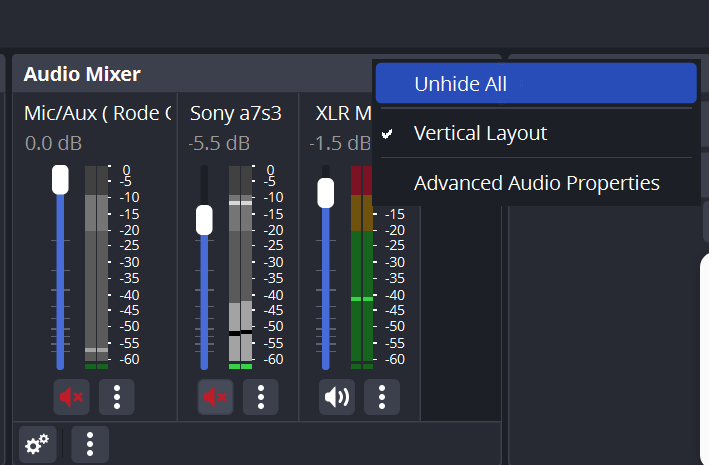
GPT cant get the UI based elements!
In OBS Studio, seeing the background hidden audio meters involves ensuring that all audio sources are visible and that the audio meter display is not obscured. Here are the steps to achieve this:
-
Ensure Audio Sources are Enabled:
-
Open OBS Studio.
-
In the main interface, look at the "Sources" panel.
-
Ensure that all audio sources you want to monitor are added and not hidden. Hidden sources won't show their audio levels.
-
Check Audio Mixer Panel:
-
The audio meters are located in the "Audio Mixer" panel, typically at the bottom center of the OBS interface.
-
If this panel is minimized or closed, you won't be able to see the meters. Ensure the "Audio Mixer" panel is visible.
-
Expand Audio Mixer:
-
If the audio meters are not showing, the mixer panel might be collapsed. Click on the small arrow or drag the panel up to expand it and make sure you can see all the audio sources.
-
Unlock Docked Panels:
-
Sometimes, the layout might be modified, hiding some parts of the interface. Right-click on any docked panel and choose "Reset UI" to bring back the default layout.
-
Check Individual Source Properties:
-
Click the gear icon next to the audio source in the "Audio Mixer" panel to open the properties.
-
Ensure the "Monitor and Output" option is selected if you want to hear the audio while monitoring.
-
Adjust Layout:
-
If you have multiple monitors, consider moving some panels to another screen for better visibility.
-
You can drag the "Audio Mixer" panel to a different location within the OBS interface or even to another monitor if needed.
Following these steps should help you see the hidden audio meters in OBS Studio.
Real Answer : **GPT not enough > it is unhide all **
Imported from rifaterdemsahin.com · 2024