After 12 hours the rescue failed and GPT
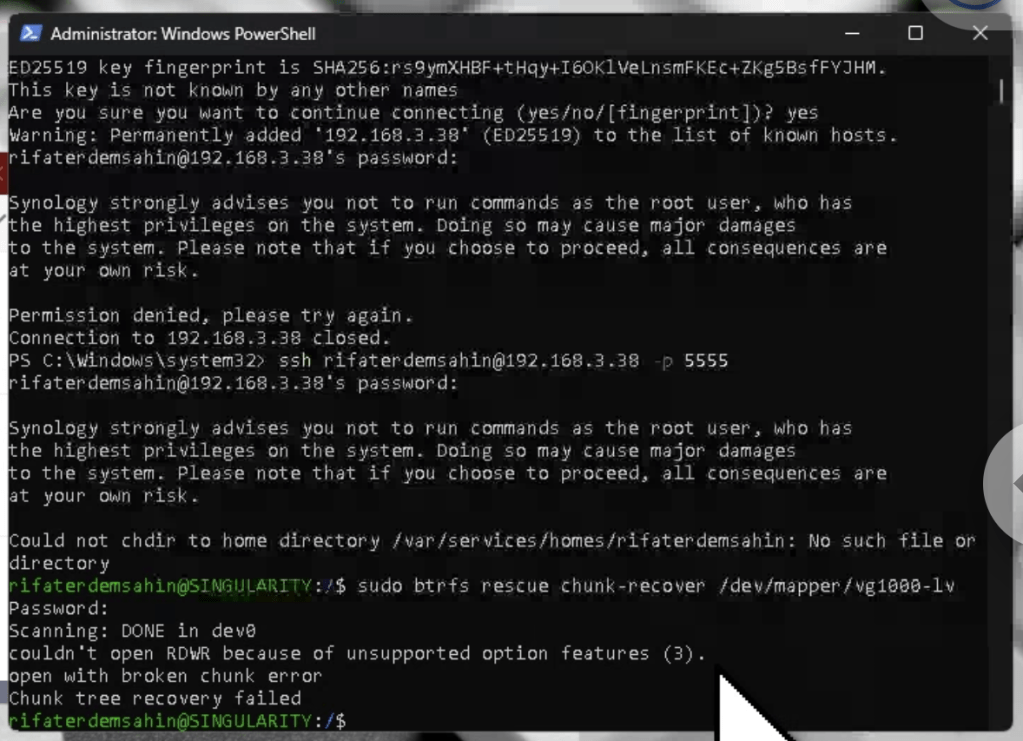
The error message "chunk tree recovery failed" and "couldn't open RDWR because of unsupported option features" indicates that there are some advanced features in use by your Btrfs filesystem that are not supported by the version of btrfs-progs installed on your system.
Given these challenges, here are alternative steps to try to recover the data:
Step 1: Use btrfs restore Directly
Even if the chunk recovery failed, attempting btrfs restore directly might still work:
- Create a Recovery Directory:
sudo mkdir /volume1/recovery_directory
- Run
btrfs restore:
sudo btrfs restore -v /dev/mapper/vg1000-lv /volume1/recovery_directory
Step 2: Mount with Options
Try mounting the filesystem with recovery options to attempt access:
- Mount with Recovery Options:
sudo mount -o ro,recovery,skip_balance /dev/mapper/vg1000-lv /mnt
If the filesystem mounts, copy the data from the mounted directory to another location.
Step 3: Use btrfs check with No Repair
Try running btrfs check without the --repair option to see if it can diagnose issues:
- Run
btrfs check:
sudo btrfs check /dev/mapper/vg1000-lv
Step 4: Use btrfs rescue super-recover
Try to recover the superblock:
- Run
btrfs rescue super-recover:
sudo btrfs rescue super-recover /dev/mapper/vg1000-lv
Professional Data Recovery Services
If these steps do not resolve the issue, consider consulting professional data recovery services, as they have specialized tools and expertise to handle complex filesystem corruption issues.
Summary
- Run
btrfs restoredirectly:
sudo mkdir /volume1/recovery_directory
sudo btrfs restore -v /dev/mapper/vg1000-lv /volume1/recovery_directory
- Mount with recovery options:
sudo mount -o ro,recovery,skip_balance /dev/mapper/vg1000-lv /mnt
- Run
btrfs checkwithout repair:
sudo btrfs check /dev/mapper/vg1000-lv
- Run
btrfs rescue super-recover:
sudo btrfs rescue super-recover /dev/mapper/vg1000-lv
- Consult professional data recovery services if necessary.
Please proceed with these steps and let me know if you encounter any issues or need further assistance.
Imported from rifaterdemsahin.com · 2024