Latest workstation
The Ultimate Tech Workstation: A Deep Dive into My Setup
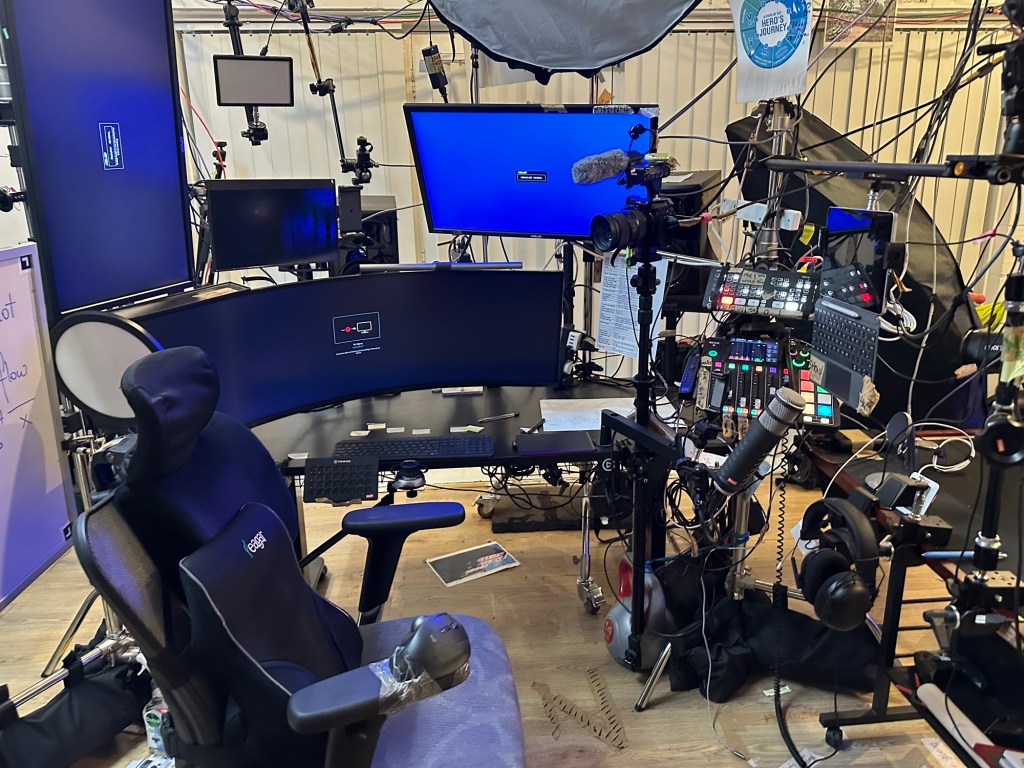
Welcome to a behind-the-scenes look at my workstation, a hub of productivity, creativity, and innovation. This post is all about the intricacies of my setup, designed to optimize my workflow and enhance my efficiency. Let's break down the components and thought processes behind this intricate arrangement.
The Heart of the Setup: Monitors and Display
At the core of my workstation are the monitors. I have a multi-display setup that includes a primary curved monitor flanked by additional screens. This arrangement allows for seamless multitasking and ensures that I have all the information I need at my fingertips. Whether I'm editing videos, streaming, or managing various projects, the expansive screen real estate is invaluable.
Audio and Video Equipment
To produce high-quality content, I rely on an array of audio and video equipment. Multiple cameras are strategically positioned to capture different angles, making my recordings dynamic and engaging. The microphones, including a professional-grade condenser mic, ensure crystal-clear audio, which is crucial for both live streams and recorded content.
Control Center: Mixers and Keyboards
Central to managing this tech arsenal is my collection of mixers and keyboards. These devices allow me to control audio levels, switch camera feeds, and manage various inputs with ease. The streamlined control panel, complete with customizable keys, makes navigating complex tasks straightforward and efficient.
Lighting Setup
Good lighting is essential for any recording space, and my setup is no exception. Overhead softbox lights provide even, diffused lighting that eliminates harsh shadows. This not only enhances the video quality but also ensures that I look professional on camera.
Ergonomics: The Chair
A good chair is crucial for maintaining comfort during long hours of work. My ergonomic chair supports my back and promotes good posture, reducing the risk of strain or injury. Comfort is paramount, and this chair makes sure I can stay productive without discomfort.
Connectivity and Cable Management
With so much equipment, cable management is a must. My setup features a carefully planned layout that minimizes clutter and ensures that all devices are easily accessible. This organization not only looks clean but also prevents technical issues that can arise from tangled or poorly managed cables.
Additional Tools and Gadgets
Beyond the primary components, my workstation includes various additional tools that enhance productivity. From headphones for monitoring audio to a whiteboard for jotting down quick ideas, every element is chosen to support a smooth workflow.
The Thought Process
Setting up this workstation was no small feat. It involved meticulous planning and a clear understanding of my needs. Each component was chosen based on its ability to improve my productivity and the overall quality of my work. The goal was to create a space where technology seamlessly integrates into my creative process.
Conclusion
This workstation represents the pinnacle of my professional setup, tailored to meet the demands of modern content creation and productivity. Every piece of equipment and every decision in its arrangement was made with one goal in mind: to create an efficient, effective, and inspiring workspace. Whether you're a tech enthusiast, a content creator, or someone looking to optimize their own setup, I hope this deep dive provides valuable insights and inspiration for your own workstation.
Imported from rifaterdemsahin.com · 2024