Zoom it rectangle needed

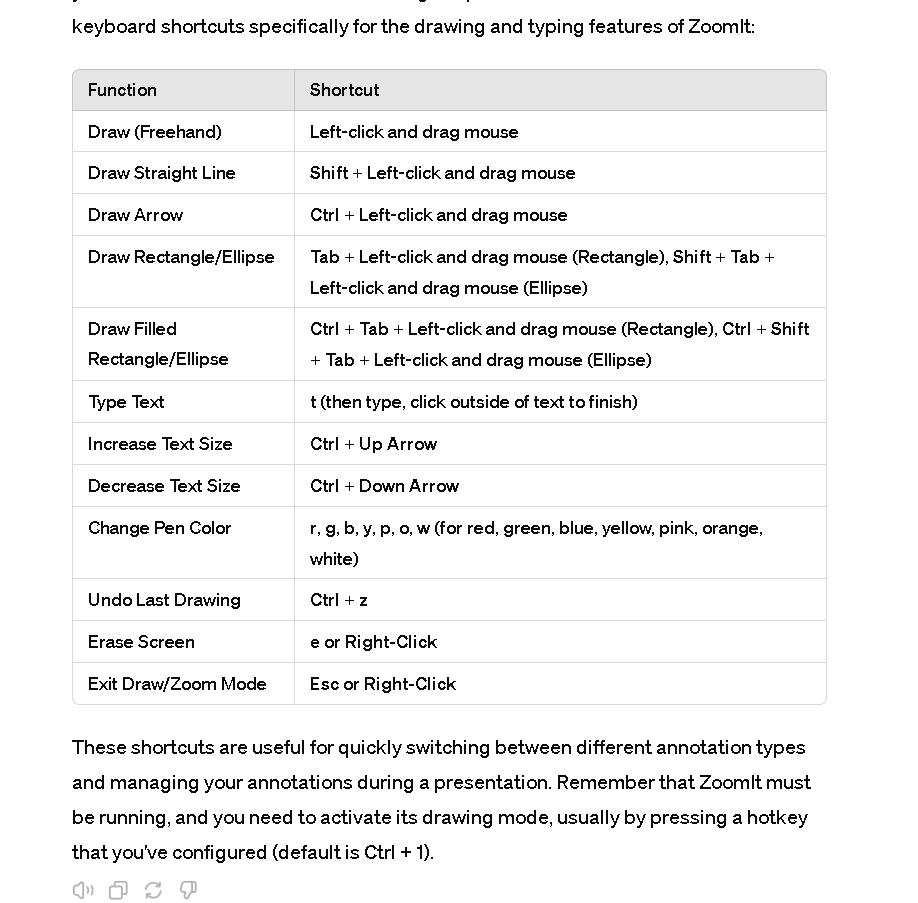
ZoomIt, developed by Sysinternals, is a screen zoom and annotation tool for technical presentations that include application demonstrations. It includes features that allow you to draw or write on the screen during the presentation. Below is a table of keyboard shortcuts specifically for the drawing and typing features of ZoomIt:
FunctionShortcutDraw (Freehand)Left-click and drag mouseDraw Straight LineShift + Left-click and drag mouseDraw ArrowCtrl + Left-click and drag mouseDraw Rectangle/EllipseTab + Left-click and drag mouse (Rectangle), Shift + Tab + Left-click and drag mouse (Ellipse)Draw Filled Rectangle/EllipseCtrl + Tab + Left-click and drag mouse (Rectangle), Ctrl + Shift + Tab + Left-click and drag mouse (Ellipse)Type Textt (then type, click outside of text to finish)Increase Text SizeCtrl + Up ArrowDecrease Text SizeCtrl + Down ArrowChange Pen Colorr, g, b, y, p, o, w (for red, green, blue, yellow, pink, orange, white)Undo Last DrawingCtrl + zErase Screene or Right-ClickExit Draw/Zoom ModeEsc or Right-Click
These shortcuts are useful for quickly switching between different annotation types and managing your annotations during a presentation. Remember that ZoomIt must be running, and you need to activate its drawing mode, usually by pressing a hotkey that you've configured (default is Ctrl + 1).
ctrl rectangle
Imported from rifaterdemsahin.com · 2024