🚀 How to Print a ChatGPT Conversation as a Clean HTML Document 🚀
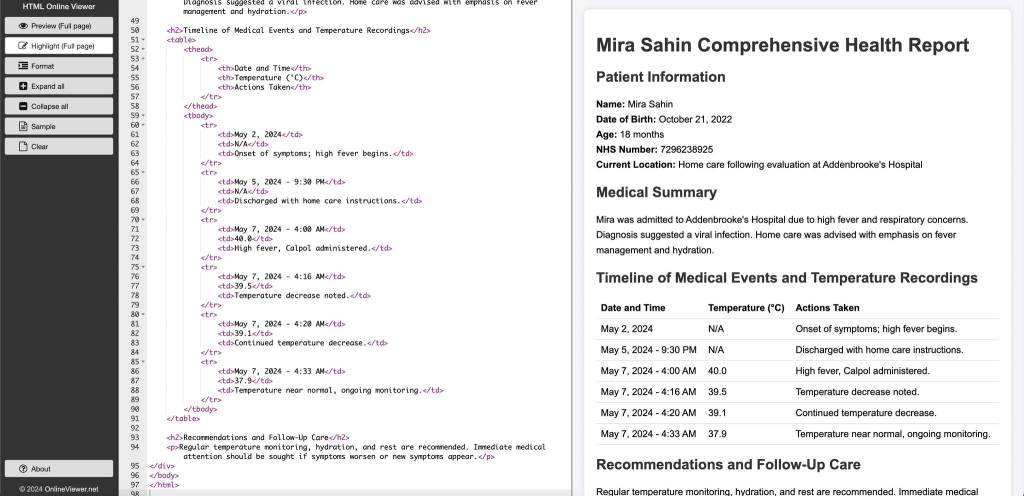
Ever wanted to share a ChatGPT conversation in a more polished format? Whether it's for documentation, a presentation, or just to keep a record, here's a straightforward way to do it:
Step 1: Create your conversation with ChatGPT. Dive into whatever topic you need insights on!
Step 2: Once you're done, ask ChatGPT to "create a full report and give an HTML output". This will transform your conversation into an HTML formatted text.
Step 3: Copy the HTML code provided by ChatGPT and head over to HTML Online Viewer. Paste your code here to see a beautifully formatted version of your conversation. > https://html.onlineviewer.net/
Step 4: Use the print function on the website to print a clean version of the page(Preview Full page). Now you have a neatly formatted document of your entire interaction!
This method not only simplifies the process of converting chat logs into a shareable document but also ensures that the output is neat and professional. Perfect for sharing insights with colleagues or referencing in meetings!
hashtag#ChatGPT hashtag#AI hashtag#TechTips hashtag#Documentation
Reference
https://www.linkedin.com/feed/update/urn:li:activity:7193457211635892224
Imported from rifaterdemsahin.com · 2024