Setting up the date diff as the main factor for the edit performance
In Google Sheets, you can use the DATEDIF function to calculate the difference between two dates. The syntax for DATEDIF is:
=DATEDIF(start_date, end_date, unit)
-
start_dateis the starting date. -
end_dateis the ending date. -
unitspecifies the type of difference you want to calculate. It can be "Y" for years, "M" for months, or "D" for days.
For example, to calculate the difference in days between two dates in cells A1 and B1, you would use:
=DATEDIF(A1, B1, "D")
Make sure the dates are entered as valid date values in Google Sheets (formatted correctly).

To evaluate the performance of the two editors based on their cost and time of delivery, you can consider both the cost per minute of footage edited and the speed of editing (minutes of footage per day). The objective is to establish a formula where performance is defined as a function of cost efficiency and speed.
Let's define the terms for the two editors:
-
Editor A: Charges $90, delivers in 9 days, 3 minutes of footage
-
Editor B: Charges $120, delivers in 3 days, 3 minutes of footage
1. Cost Efficiency: Cost per minute of footage.
-
Cost efficiency for Editor A: ( \frac{\$90}{3 \text{ min}} = \$30/\text{min} )
-
Cost efficiency for Editor B: ( \frac{\$120}{3 \text{ min}} = \$40/\text{min} )
2. Speed of Editing: Minutes of footage edited per day.
-
Speed for Editor A: ( \frac{3 \text{ min}}{9 \text{ days}} = 0.33 \text{ min/day} )
-
Speed for Editor B: ( \frac{3 \text{ min}}{3 \text{ days}} = 1 \text{ min/day} )
Formula for Performance
Let's create a formula where the performance ( P ) of an editor is a function of both cost efficiency ( C ) and speed ( S ). You can define performance as inversely proportional to cost and directly proportional to speed.
[ P = \frac{S}{C} ]
Where:
-
( S ) is the speed of editing (minutes per day).
-
( C ) is the cost per minute of footage.
Using this formula, calculate the performance for both editors:
-
Performance of Editor A: ( P_A = \frac{0.33}{30} )
-
Performance of Editor B: ( P_B = \frac{1}{40} )
Let's compute these to compare numerically which editor has better performance.
The performance calculations for the editors are as follows:
-
Performance of Editor A: 0.011
-
Performance of Editor B: 0.025
With this formula, where performance ( P ) is calculated as ( \frac{S}{C} ) (speed of editing divided by cost efficiency), Editor B demonstrates a higher performance value compared to Editor A. This means that despite being more expensive, Editor B's faster delivery makes his performance rating better when both cost and speed are considered.
time is of the essence > https://docs.google.com/spreadsheets/d/1dtuG0oJte3ebFubnp1TEZ7BdHupkckLASYqm96iRgMc/edit#gid=1366945217
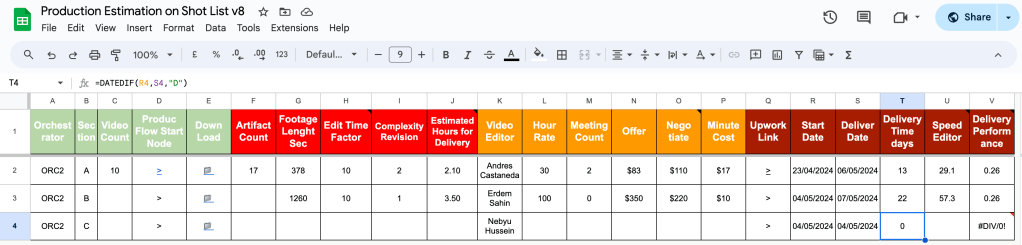
If i do the job in 22 days with x3 cost i would be the same performance with Andres
So having an editor who does have the bandwith is the key in the performance metric
Imported from rifaterdemsahin.com · 2024