asking gpt to create my bash files with ease
To include the process of creating a file, making it executable, and running it as a one-liner directly in the Mac's Terminal, you can use a combination of command-line techniques. Here's a concise way to do it using echo, redirection to create the file, and then setting permissions and executing it:
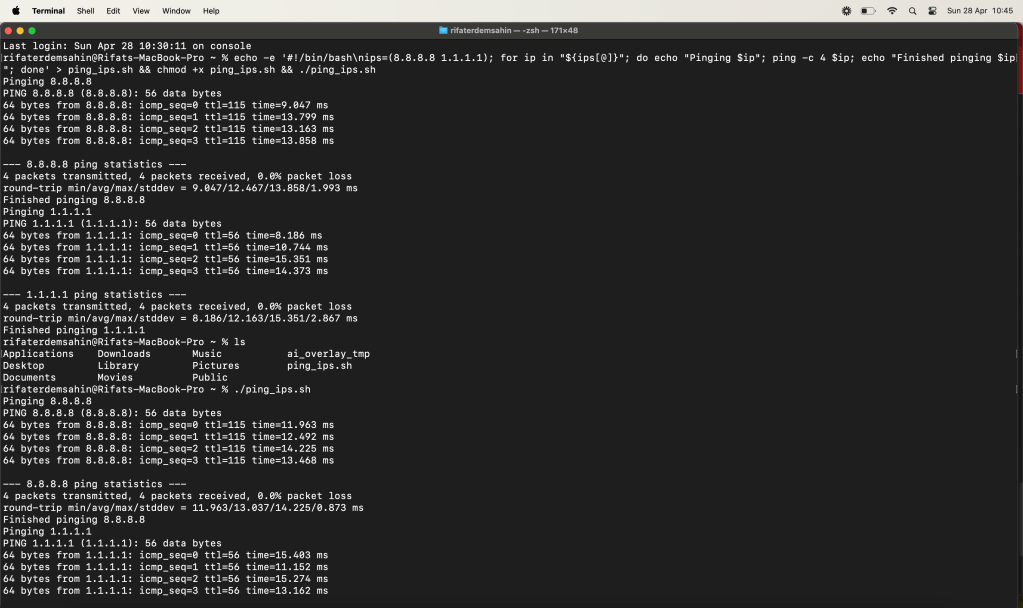
echo -e '#!/bin/bash\nips=(8.8.8.8 1.1.1.1); for ip in "${ips[@]}"; do echo "Pinging $ip"; ping -c 4 $ip; echo "Finished pinging $ip"; done' > ping_ips.sh && chmod +x ping_ips.sh && ./ping_ips.sh
Here’s what each part of this command does:
-
echo -e: The-eflag enables interpretation of backslash escapes. This is used here to include newlines (\n) in the echoed string to ensure the script content is formatted correctly in the file. -
Redirect to File (
>): This takes the output fromechoand writes it toping_ips.sh. -
chmod +x: Makes the fileping_ips.shexecutable. -
./ping_ips.sh: Executes the script.
To run this command:
-
Copy the entire line.
-
Paste it into your Mac's Terminal.
-
Press Enter.
The script will be created, made executable, and run in one go. You’ll see the ping results for each IP address in the output directly in your Terminal.
Practical runners
Imported from rifaterdemsahin.com · 2024