homebrew updates
https://apple.stackexchange.com/questions/56419/how-can-i-update-everything-installed-through-homebrew-after-osx-upgrade
6 packages in one go
Last login: Sun Apr  7 14:02:26 on console
                rifaterdemsahin@Rifats-MacBook-Pro ~ % brew upgrade
                ==> Auto-updating Homebrew...
                Adjust how often this is run with HOMEBREW_AUTO_UPDATE_SECS or disable with
                HOMEBREW_NO_AUTO_UPDATE. Hide these hints with HOMEBREW_NO_ENV_HINTS (see `man brew`).
                ==> Homebrew collects anonymous analytics.
                Read the analytics documentation (and how to opt-out) here:
                  https://docs.brew.sh/Analytics
                No analytics have been recorded yet (nor will be during this `brew` run).

                ==> Homebrew is run entirely by unpaid volunteers. Please consider donating:
                  https://github.com/Homebrew/brew#donations

                ==> Auto-updated Homebrew!
                Updated 2 taps (homebrew/core and homebrew/cask).
                ==> New Formulae
                c-blosc2            liblc3              overarch            rustcat
                dissent             libscfg             parsedmarc          sysaidmin
                ffmpeg@6            logdy               policy_sentry       tartufo
                gitu                manim               protoc-gen-js       uni-algo
                ingress2gateway     mantra              rage                valkey
                jnv                 msieve              ratchet             vfox
                jtbl                navidrome           redict
                lexido              oj                  rtabmap
                ==> New Casks
                arctic                     halloy                     phoenix-code
                boltai                     hhkb-studio                requestly
                capcut                     ireal-pro                  starnet2
                clearvpn                   irpf2024                   toneprint
                ente-auth                  juxtacode                  viable
                fujifilm-x-raw-studio      lookaway                   xcodepilot
                galaxybudsclient           loungy                     yandex-music
                godspeed                   outfox

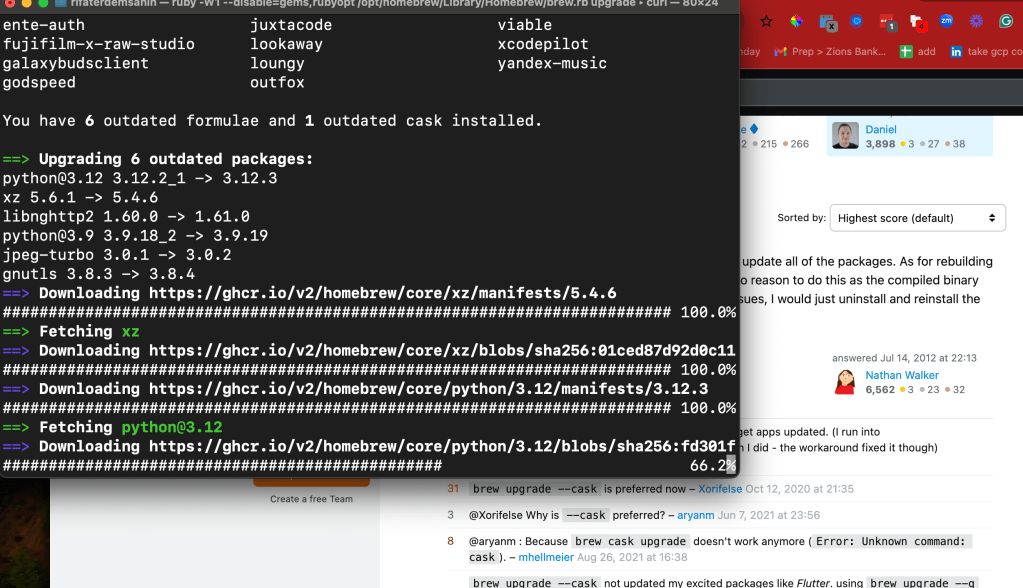
                You have 6 outdated formulae and 1 outdated cask installed.

                ==> Upgrading 6 outdated packages:
                [email protected] 3.12.2_1 -> 3.12.3
                xz 5.6.1 -> 5.4.6
                libnghttp2 1.60.0 -> 1.61.0
                [email protected] 3.9.18_2 -> 3.9.19
                jpeg-turbo 3.0.1 -> 3.0.2
                gnutls 3.8.3 -> 3.8.4
                ==> Downloading https://ghcr.io/v2/homebrew/core/xz/manifests/5.4.6
                ######################################################################### 100.0%
                ==> Fetching xz
                ==> Downloading https://ghcr.io/v2/homebrew/core/xz/blobs/sha256:01ced87d92d0c11
                ######################################################################### 100.0%
                ==> Downloading https://ghcr.io/v2/homebrew/core/python/3.12/manifests/3.12.3
                ######################################################################### 100.0%
                ==> Fetching [email protected]
                ==> Downloading https://ghcr.io/v2/homebrew/core/python/3.12/blobs/sha256:fd301f
                ######################################################################### 100.0%
                ==> Downloading https://ghcr.io/v2/homebrew/core/libnghttp2/manifests/1.61.0
                ######################################################################### 100.0%
                ==> Fetching libnghttp2
                ==> Downloading https://ghcr.io/v2/homebrew/core/libnghttp2/blobs/sha256:6bd6cd9
                ######################################################################### 100.0%
                ==> Downloading https://ghcr.io/v2/homebrew/core/python/3.9/manifests/3.9.19
                ######################################################################### 100.0%
                ==> Fetching [email protected]
                ==> Downloading https://ghcr.io/v2/homebrew/core/python/3.9/blobs/sha256:319f081
                ######################################################################### 100.0%
                ==> Downloading https://ghcr.io/v2/homebrew/core/jpeg-turbo/manifests/3.0.2
                ######################################################################### 100.0%
                ==> Fetching jpeg-turbo
                ==> Downloading https://ghcr.io/v2/homebrew/core/jpeg-turbo/blobs/sha256:898ba61
                ######################################################################### 100.0%
                ==> Downloading https://ghcr.io/v2/homebrew/core/gnutls/manifests/3.8.4
                ######################################################################### 100.0%
                ==> Fetching gnutls
                ==> Downloading https://ghcr.io/v2/homebrew/core/gnutls/blobs/sha256:46373a7206c
                ######################################################################### 100.0%
                ==> Upgrading xz
                  5.6.1 -> 5.4.6
                ==> Pouring xz--5.4.6.arm64_sonoma.bottle.tar.gz
                🍺  /opt/homebrew/Cellar/xz/5.4.6: 163 files, 2.6MB
                ==> Running `brew cleanup xz`...
                Disable this behaviour by setting HOMEBREW_NO_INSTALL_CLEANUP.
                Hide these hints with HOMEBREW_NO_ENV_HINTS (see `man brew`).
                Removing: /opt/homebrew/Cellar/xz/5.6.1... (166 files, 2.7MB)
                Removing: /Users/rifaterdemsahin/Library/Caches/Homebrew/xz_bottle_manifest--5.6.1... (7.5KB)
                Removing: /Users/rifaterdemsahin/Library/Caches/Homebrew/xz--5.6.1... (689.0KB)
                ==> Upgrading [email protected]
                  3.12.2_1 -> 3.12.3
                ==> Pouring [email protected]_sonoma.bottle.tar.gz
                ==> /opt/homebrew/Cellar/[email protected]/3.12.3/bin/python3.12 -Im ensurepip
                ==> /opt/homebrew/Cellar/[email protected]/3.12.3/bin/python3.12 -Im pip install -v --
                🍺  /opt/homebrew/Cellar/[email protected]/3.12.3: 3,271 files, 65.7MB
                ==> Running `brew cleanup [email protected]`...
                Removing: /opt/homebrew/Cellar/[email protected]/3.12.2_1... (3,243 files, 65.6MB)
                Removing: /Users/rifaterdemsahin/Library/Caches/Homebrew/[email protected]_bottle_manifest--3.12.2_1... (23.2KB)
                Removing: /Users/rifaterdemsahin/Library/Caches/Homebrew/[email protected]_1... (15.8MB)
                ==> Upgrading libnghttp2
                  1.60.0 -> 1.61.0
                ==> Pouring libnghttp2--1.61.0.arm64_sonoma.bottle.tar.gz
                🍺  /opt/homebrew/Cellar/libnghttp2/1.61.0: 13 files, 804.6KB
                ==> Running `brew cleanup libnghttp2`...
                Removing: /opt/homebrew/Cellar/libnghttp2/1.60.0... (13 files, 808.5KB)
                Removing: /Users/rifaterdemsahin/Library/Caches/Homebrew/libnghttp2_bottle_manifest--1.60.0... (7.4KB)
                Removing: /Users/rifaterdemsahin/Library/Caches/Homebrew/libnghttp2--1.60.0... (225.0KB)
                ==> Upgrading [email protected]
                  3.9.18_2 -> 3.9.19
                ==> Pouring [email protected]_sonoma.bottle.tar.gz
                ==> /opt/homebrew/Cellar/[email protected]/3.9.19/bin/python3.9 -Im ensurepip
                ==> /opt/homebrew/Cellar/[email protected]/3.9.19/bin/python3.9 -Im pip install -v --no
                ==> Caveats
                Python has been installed as
                  /opt/homebrew/bin/python3.9

                Unversioned and major-versioned symlinks `python`, `python3`, `python-config`, `python3-config`, `pip`, `pip3`, etc. pointing to
                `python3.9`, `python3.9-config`, `pip3.9` etc., respectively, have been installed into
                  /opt/homebrew/opt/[email protected]/libexec/bin

                You can install Python packages with
                  pip3.9 install <package>
                They will install into the site-package directory
                  /opt/homebrew/lib/python3.9/site-packages

                tkinter is no longer included with this formula, but it is available separately:
                  brew install [email protected]

                If you do not need a specific version of Python, and always want Homebrew's `python3` in your PATH:
                  brew install python3

                See: https://docs.brew.sh/Homebrew-and-Python
                ==> Summary
                🍺  /opt/homebrew/Cellar/[email protected]/3.9.19: 3,068 files, 57.6MB
                ==> Running `brew cleanup [email protected]`...
                Removing: /opt/homebrew/Cellar/[email protected]/3.9.18_2... (3,068 files, 56.8MB)
                Removing: /Users/rifaterdemsahin/Library/Caches/Homebrew/[email protected]_bottle_manifest--3.9.18_2... (23.4KB)
                Removing: /Users/rifaterdemsahin/Library/Caches/Homebrew/[email protected]_2... (14MB)
                ==> Upgrading jpeg-turbo
                  3.0.1 -> 3.0.2
                ==> Pouring jpeg-turbo--3.0.2.arm64_sonoma.bottle.tar.gz
                🍺  /opt/homebrew/Cellar/jpeg-turbo/3.0.2: 44 files, 3.4MB
                ==> Running `brew cleanup jpeg-turbo`...
                Removing: /opt/homebrew/Cellar/jpeg-turbo/3.0.1... (44 files, 3.4MB)
                Removing: /Users/rifaterdemsahin/Library/Caches/Homebrew/jpeg-turbo_bottle_manifest--3.0.1... (7.7KB)
                Removing: /Users/rifaterdemsahin/Library/Caches/Homebrew/jpeg-turbo--3.0.1... (1.1MB)
                ==> Upgrading gnutls
                  3.8.3 -> 3.8.4
                ==> Pouring gnutls--3.8.4.arm64_sonoma.bottle.tar.gz
                🍺  /opt/homebrew/Cellar/gnutls/3.8.4: 1,292 files, 10.8MB
                ==> Running `brew cleanup gnutls`...
                Removing: /opt/homebrew/Cellar/gnutls/3.8.3... (1,290 files, 10.8MB)
                Removing: /Users/rifaterdemsahin/Library/Caches/Homebrew/gnutls_bottle_manifest--3.8.3... (17.9KB)
                Removing: /Users/rifaterdemsahin/Library/Caches/Homebrew/gnutls--3.8.3... (2.9MB)
                ==> Casks with 'auto_updates true' or 'version :latest' will not be upgraded; pa
                ==> Upgrading 1 outdated package:
                anydesk 8.0.0 -> 8.0.1
                ==> Upgrading anydesk
                ==> Downloading https://download.anydesk.com/anydesk.dmg
                ######################################################################### 100.0%
                Warning: No checksum defined for cask 'anydesk', skipping verification.
                ==> Removing files:
                /Library/LaunchAgents/com.philandro.anydesk.Frontend.plist
                Password:
                /Library/LaunchDaemons/com.philandro.anydesk.Helper.plist
                /Library/LaunchDaemons/com.philandro.anydesk.service.plist
                /Library/PrivilegedHelperTools/com.philandro.anydesk.Helper
                ==> Backing App 'AnyDesk.app' up to '/opt/homebrew/Caskroom/anydesk/8.0.0/AnyDes
                ==> Removing App '/Applications/AnyDesk.app'
                ==> Moving App 'AnyDesk.app' to '/Applications/AnyDesk.app'
                ==> Purging files for version 8.0.0 of Cask anydesk
                🍺  anydesk was successfully upgraded!
                ==> Caveats
                ==> [email protected]
                Python has been installed as
                  /opt/homebrew/bin/python3.9

                Unversioned and major-versioned symlinks `python`, `python3`, `python-config`, `python3-config`, `pip`, `pip3`, etc. pointing to
                `python3.9`, `python3.9-config`, `pip3.9` etc., respectively, have been installed into
                  /opt/homebrew/opt/[email protected]/libexec/bin

                You can install Python packages with
                  pip3.9 install <package>
                They will install into the site-package directory
                  /opt/homebrew/lib/python3.9/site-packages

                tkinter is no longer included with this formula, but it is available separately:
                  brew install [email protected]

                If you do not need a specific version of Python, and always want Homebrew's `python3` in your PATH:
                  brew install python3

                See: https://docs.brew.sh/Homebrew-and-Python
Imported from rifaterdemsahin.com · 2024