Windows Mover By BarRaider At the End
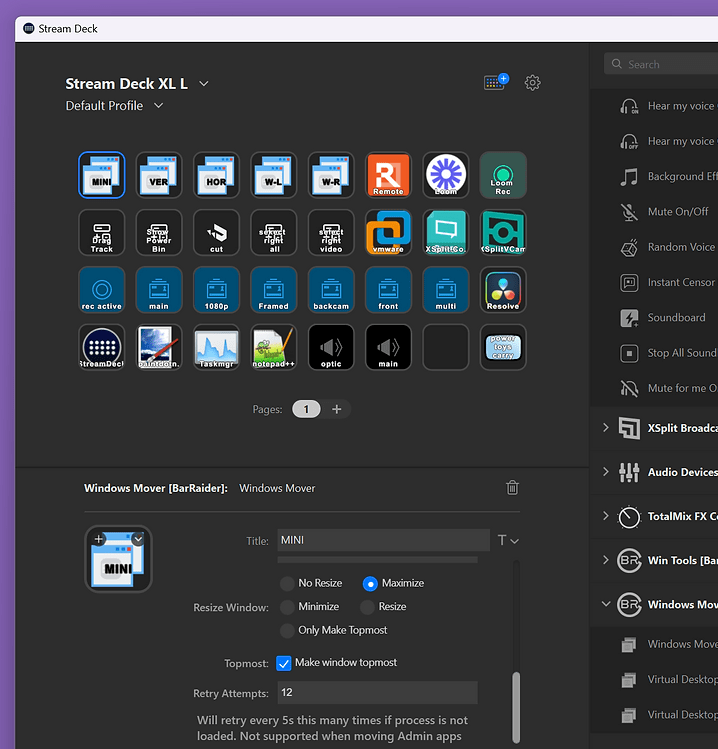
The "Windows Mover and Resizer" plugin by BarRaider is a powerful tool for controlling the position and size of application windows on a Windows PC. It's designed for use with the Elgato Stream Deck, allowing users to maximize, minimize, change the height, width, and position of windows, and support moving applications across multiple screens. Notably, it has been updated to include Virtual Desktop support for newer versions of Windows 11 (22H2 and 23H2 versions), enhancing its functionality with virtual desktops by enabling features like pinning/unpinning apps and moving apps across virtual desktops.
To get started with this plugin, you can download and install it from the Elgato Store or via BarRaider's Discord server. Once installed, navigate to the Windows Mover section within the Stream Deck software, and you can drag and drop the "Windows Mover" action into your Stream Deck setup. The plugin offers options to move the currently focused window or to move a specific application by selecting it from the App Name dropdown. Moreover, it provides flexibility in selecting the target screen for the window and customizing the window's coordinates and size.
The plugin supports a wide range of functionalities, including multi-screen support, auto-retry for moving windows, a "Make Topmost" feature to bring windows to the front, and filters for process location and window title. These features make it a versatile tool for streamlining the management of application windows, especially for users with multiple monitors or those who utilize virtual desktops.
For more detailed instructions, including a step-by-step text tutorial and video guides, you can visit BarRaider's official documentation【5†source】. Further information and the latest updates on the plugin are available on the GitHub repository【7†source】 and the Stream Deck App Store【6†source】.
Imported from rifaterdemsahin.com · 2024