Hacking whatsapp video upload limit
You're looking to install GPAC, a multimedia tool that provides various functionalities including video processing, and then use MP4Box (which is part of GPAC) to split a video file into chunks. Here's a step-by-step guide on how to do this on a system that supports Chocolatey for package management, like a Windows environment.
Step 1: Install GPAC using Chocolatey
First, you need to install Chocolatey, a package manager for Windows, if you haven't already. Open a PowerShell window as administrator and run the following command to install Chocolatey:
Set-ExecutionPolicy Bypass -Scope Process -Force; [System.Net.ServicePointManager]::SecurityProtocol = [System.Net.ServicePointManager]::SecurityProtocol -bor 3072; iex ((New-Object System.Net.WebClient).DownloadString('https://chocolatey.org/install.ps1'))
After installing Chocolatey, you can install GPAC by running the following command in the same PowerShell window:
choco install gpac -y
This command installs GPAC and automatically agrees to the licenses (-y flag).
Step 2: Splitting the Video File with MP4Box
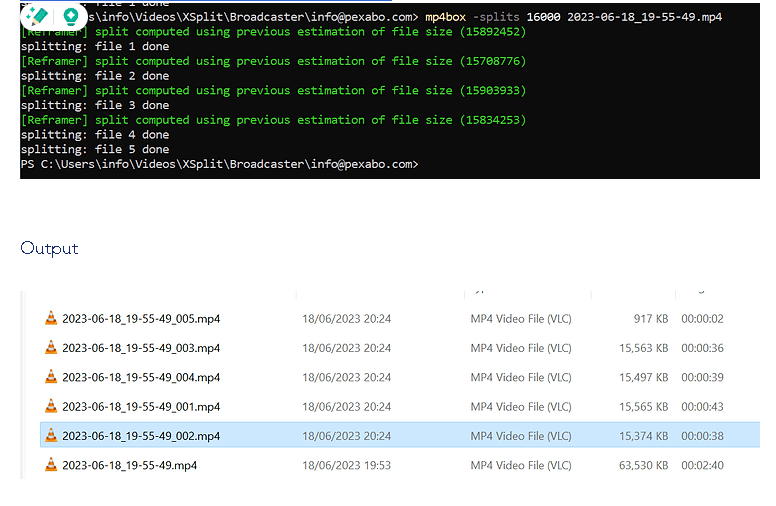
Once GPAC is installed, you can use MP4Box to split your video file. MP4Box can split files based on size, duration, or chapters. To split a video file into chunks of a specific size (in this case, 16 MB), you can use the following command in the command prompt or PowerShell:
mp4box -splits 16000 2023-06-18_19-55-49.mp4
-
-splits 16000: This tells MP4Box to split the video file into chunks of 16,000 KB (or approximately 16 MB). Adjust this number based on how large you want each chunk to be. -
2023-06-18_19-55-49.mp4: This is the name of your video file. Make sure to replace this with the actual file name you wish to split.
This command will produce several smaller files from your original video, each with a size close to but not exceeding 16 MB. These files will be named using the original file name followed by an index (e.g., 2023-06-18_19-55-49_001.mp4, 2023-06-18_19-55-49_002.mp4, etc.).
Please ensure you run these commands in a directory where you have permissions to write files, and your video file is located. Also, remember to adjust the paths and filenames according to your setup.
Imported from rifaterdemsahin.com · 2024