Creating report for Azure Support for SQL Debugging
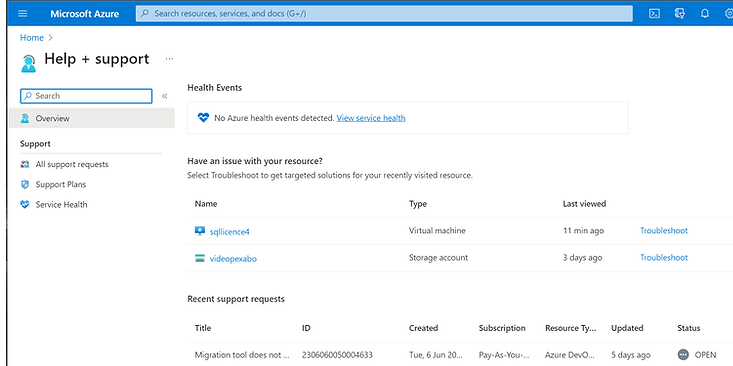
To create a report for Azure Support and manage the necessary files and links as described, you can follow these steps:
1. Take the ID from the Support Ticket:
-
Log into the Azure portal.
-
Go to the "Help + support" section.
-
Find your support ticket and note the ID.
2. Append the ID to the Google Drive Folder:
-
Navigate to Google Drive and locate the folder where you want to append the ID.
-
Rename the folder by right-clicking on it and selecting "Rename."
-
Append the support ticket ID to the folder name for easy identification.
3. Upload the Necessary DACPACs for the SQL Package Team:
-
Package your SQL database into a DACPAC file. This usually involves using SQL Server Data Tools (SSDT) or SQL Server Management Studio (SSMS).
-
Once the DACPAC files are ready, go to the Google Drive folder you just renamed.
-
Drag and drop the DACPAC files into the folder or use the "New" button to upload the files.
4. Share the Link with the SQL Package Team:
-
Once the files are uploaded, right-click on the folder in Google Drive.
-
Choose "Share" and then enter the email addresses of the SQL package team members you wish to share the folder with.
-
Ensure you adjust the sharing settings to either "Editor" or "Viewer," depending on what level of access you want to grant.
-
Click "Send" to share the folder link with the team.
Additional Tips:
-
Communication: Ensure to communicate with the SQL package team, letting them know the support ticket ID and that the necessary DACPAC files have been uploaded and shared.
-
Follow-Up: Depending on the urgency, follow up with the team to ensure they've received access and everything is in order.
-
Security: Be mindful of the data and information in the DACPAC files and ensure only authorized personnel have access to this information.
This workflow should help you manage the support process with Azure and coordinate effectively with the SQL package team.
Imported from rifaterdemsahin.com · 2024